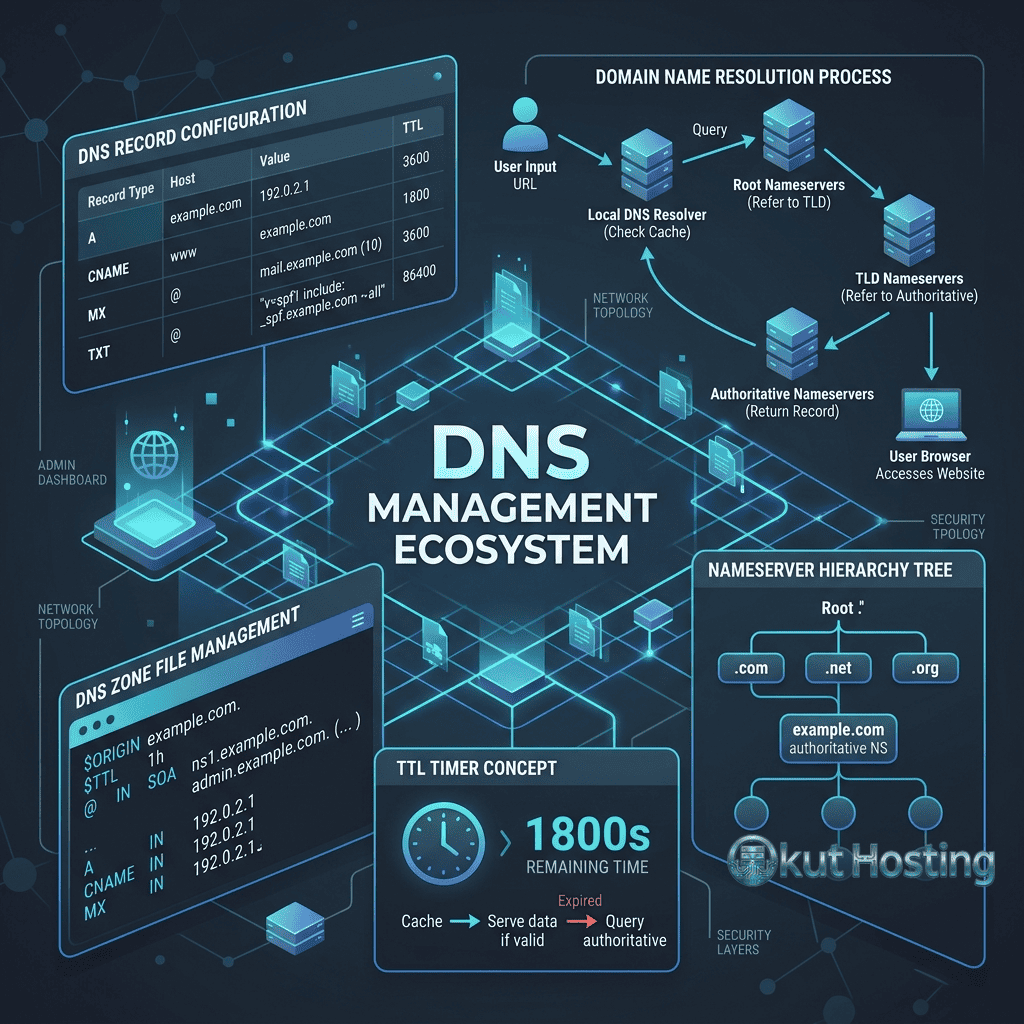
The Domain Name System (DNS) is the fundamental infrastructure that translates human-readable domain names (example.com) into machine-readable IP addresses (192.168.1.1) that computers use to communicate. DNS management involves configuring various record types that control how domain names resolve to servers, how email is routed, how domain ownership is verified, and how various services connect to the domain. Understanding DNS management is essential for website owners, developers, and administrators who need to connect domains to hosting providers, configure email services, and implement security features.
This guide covers DNS fundamentals, record types, configuration procedures, propagation behavior, troubleshooting techniques, and best practices for managing DNS records. The information applies across all major registrars and DNS hosting providers, with practical guidance for common configuration scenarios.
How DNS Works
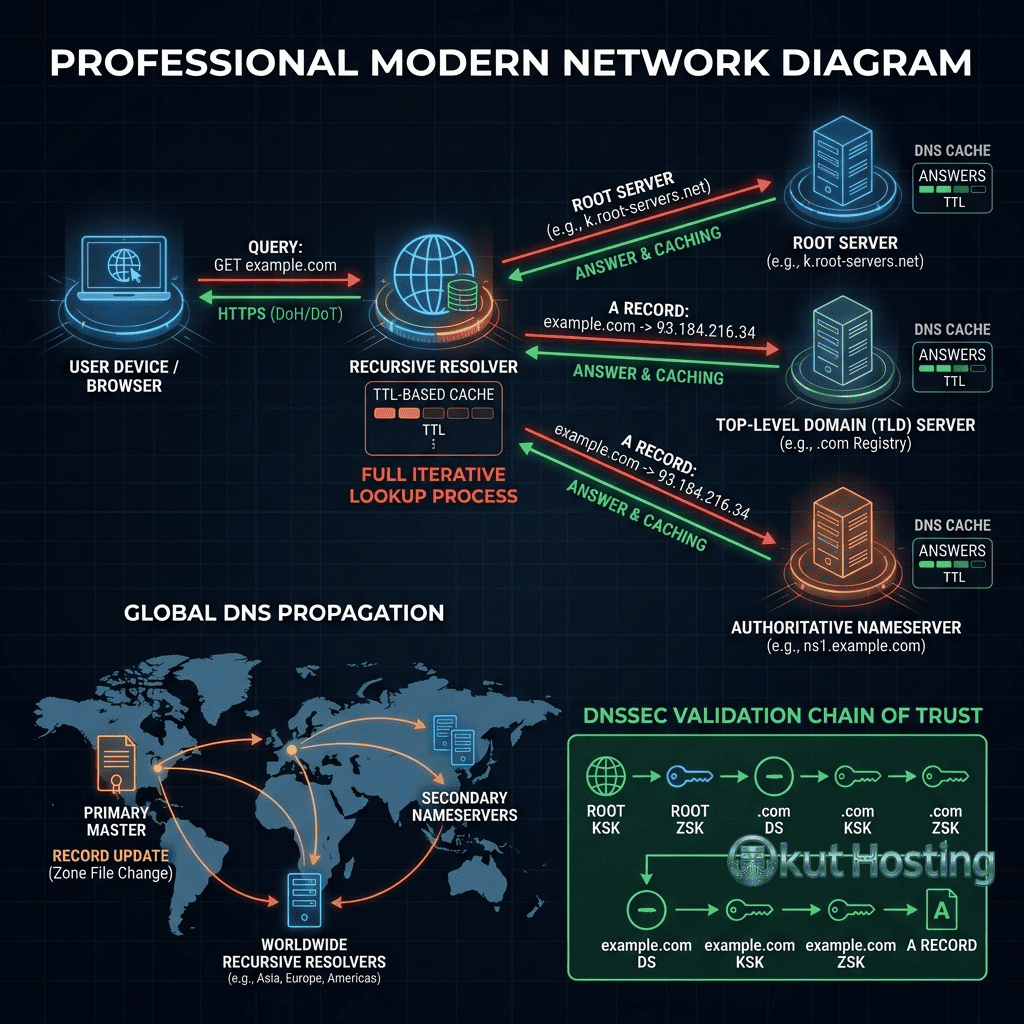
When a user types a domain name into their browser, the DNS resolution process begins with a query from the user’s device to their configured DNS resolver (typically provided by the ISP or a public resolver like Google’s 8.8.8.8 or Cloudflare’s 1.1.1.1). The resolver queries the root nameservers, which direct the query to the appropriate TLD nameservers (.com, .net, etc.), which then direct the query to the domain’s authoritative nameservers where the actual DNS records are stored. The authoritative nameservers return the requested information (IP address, mail server, etc.) through the chain back to the user’s device.
DNS caching at multiple levels (browser, operating system, resolver, intermediate servers) stores previously resolved queries to reduce lookup times and DNS server load. Cache duration is controlled by the TTL (Time to Live) value configured for each DNS record. Understanding caching behavior is important for DNS changes, as cached records continue serving old information until the cache expires.
A Records (Address Records)
A records are the most fundamental DNS record type, mapping a domain name directly to an IPv4 address. When a user visits a website, the A record directs their request to the correct web server’s IP address. A records are configured for the root domain (example.com) and for subdomains (blog.example.com, shop.example.com), with each subdomain potentially pointing to a different server.
Common A record configurations include: pointing the root domain to a web hosting server; pointing subdomains to different servers for different services; and configuring multiple A records for the same domain for basic load distribution. When setting up web hosting, the hosting provider supplies the IP address that should be entered as the A record value.
AAAA Records (IPv6 Address Records)
AAAA records serve the same function as A records but map domain names to IPv6 addresses instead of IPv4 addresses. As IPv6 adoption continues growing, configuring AAAA records alongside A records ensures that the domain is accessible over both IPv4 and IPv6 networks. Many modern hosting providers and CDN services provide both IPv4 and IPv6 addresses for dual-stack connectivity.
CNAME Records (Canonical Name Records)
CNAME records create aliases that point one domain name to another domain name rather than directly to an IP address. When a DNS resolver encounters a CNAME record, it performs an additional lookup on the target domain to find the final IP address. CNAME records are commonly used for: pointing www.example.com to example.com; pointing subdomains to CDN endpoints (blog.example.com → cdn.provider.com); and configuring third-party services that provide CNAME targets rather than IP addresses.
Important CNAME restrictions: CNAME records cannot coexist with other record types for the same name (a domain with a CNAME cannot also have A, MX, or TXT records at the same level); and CNAME records should not be used for the root domain (example.com) per DNS standards, though some DNS providers offer CNAME flattening or ALIAS records to work around this limitation.
MX Records (Mail Exchange Records)
MX records specify the mail servers responsible for receiving email for the domain. When someone sends an email to user@example.com, the sending mail server queries the MX records for example.com to determine where to deliver the message. MX records include a priority value (lower numbers = higher priority) that determines the order in which mail servers are tried for message delivery.
Common MX record configurations: for Google Workspace, multiple MX records point to Google’s mail servers (aspmx.l.google.com, etc.) with ascending priority values; for Microsoft 365, MX records point to Microsoft’s mail infrastructure; for custom email hosting, MX records point to the email hosting provider’s servers. Incorrect MX record configuration is one of the most common causes of email delivery failures.
TXT Records (Text Records)
TXT records store arbitrary text data associated with a domain and serve multiple important purposes. The most common TXT record uses include: SPF (Sender Policy Framework) records that specify which servers are authorized to send email on behalf of the domain, helping prevent email spoofing; DKIM (DomainKeys Identified Mail) records that provide cryptographic email authentication; DMARC (Domain-based Message Authentication, Reporting and Conformance) records that specify email authentication policies; domain verification records that prove domain ownership to services like Google Search Console, Microsoft 365, and various SaaS platforms; and custom application data storage.
Email authentication through TXT records (SPF, DKIM, DMARC) is increasingly important for email deliverability, as major email providers use these records to verify that incoming messages are legitimate and not spoofed.
NS Records (Nameserver Records)
NS records specify the authoritative nameservers for the domain — the DNS servers that store and serve the domain’s DNS records. NS records are typically configured at the registrar level and determine which DNS hosting service manages the domain’s records. Changing NS records to point to a different DNS provider (e.g., from the registrar’s DNS to Cloudflare’s DNS) transfers DNS management to the new provider while maintaining domain registration at the original registrar.
SRV Records (Service Records)
SRV records specify the location (hostname and port) of specific services associated with the domain. SRV records are used by protocols that support service discovery, including SIP (VoIP), XMPP (messaging), and some Microsoft services. SRV records include priority and weight values for load balancing and failover configuration. While less commonly configured than A, CNAME, and MX records, SRV records are essential for specific application protocols and communication services.
CAA Records (Certificate Authority Authorization)
CAA records specify which Certificate Authorities (CAs) are authorized to issue SSL/TLS certificates for the domain. Configuring CAA records prevents unauthorized CAs from issuing certificates for the domain, reducing the risk of certificate-based attacks. For domains using Let’s Encrypt, the CAA record would authorize letsencrypt.org. CAA records add a security layer that complements SSL/TLS certificate management without requiring changes to the certificate issuance process itself.
TTL (Time to Live)
TTL values control how long DNS resolvers and caches store DNS records before requesting fresh data from the authoritative nameservers. TTL is measured in seconds, with common values including: 300 seconds (5 minutes) for records that change frequently; 3600 seconds (1 hour) for standard configurations; and 86400 seconds (24 hours) for stable, rarely-changed records. Lower TTL values ensure faster propagation of DNS changes but increase DNS query traffic. Before making DNS changes, reducing TTL values in advance ensures that old records expire quickly when changes are implemented.
DNS Propagation
DNS propagation refers to the time required for DNS changes to take effect across the global DNS infrastructure. When DNS records are updated, the new information must propagate through the caching hierarchy — existing cached copies of the old records must expire (based on TTL values) before resolvers request and cache the new records. Propagation typically takes minutes to hours for most changes, though full global propagation can take up to 48 hours in some cases.
Factors affecting propagation speed include: TTL values of the changed records; caching behavior of individual DNS resolvers; geographic distribution of DNS infrastructure; and the DNS hosting provider’s update mechanisms. DNS propagation checking tools (whatsmydns.net, dnschecker.org) enable monitoring propagation progress across different geographic locations.
DNS Configuration Best Practices
Essential best practices for DNS management include: documenting all DNS records and their purposes to maintain configuration clarity; using appropriate TTL values based on how frequently records change; configuring email authentication records (SPF, DKIM, DMARC) for all domains that send email; implementing CAA records to restrict certificate issuance; testing DNS changes with online tools before and after implementation; maintaining backup documentation of DNS configurations for disaster recovery; and regularly auditing DNS records to remove obsolete entries.
DNS Hosting Providers
DNS hosting can be provided by the domain registrar (most registrars include basic DNS hosting with domain registration) or by specialized third-party DNS providers. Popular third-party DNS providers include Cloudflare (free DNS with CDN and security features), Amazon Route 53 (enterprise-grade DNS with advanced routing), Google Cloud DNS (scalable managed DNS), and NS1 (API-driven intelligent DNS). Third-party DNS providers typically offer advanced features including geographic routing, weighted round-robin, failover configurations, and detailed analytics that basic registrar DNS does not include.
Managed DNS vs Basic DNS
Basic DNS hosting provided by registrars covers standard record management — creating, modifying, and deleting DNS records through a web interface. Managed DNS services from specialized providers add enterprise features including: Anycast DNS networks that distribute DNS servers globally for faster resolution worldwide; automatic failover that detects server outages and redirects traffic; geographic routing that directs users to the nearest server location; weighted load balancing that distributes traffic across multiple servers based on configured ratios; and real-time DNS analytics providing visibility into query patterns and performance.
Round-Robin DNS
Round-robin DNS is a basic load distribution technique where multiple A records with the same name point to different IP addresses. DNS resolvers rotate through the available addresses, distributing traffic across multiple servers. While round-robin DNS provides basic load distribution, it does not provide health checking — if one server goes down, DNS continues sending traffic to the failed server. For production environments requiring reliable load balancing, dedicated load balancers or managed DNS services with health checking provide more robust traffic distribution.
Wildcard DNS Records
Wildcard DNS records (*.example.com) match any subdomain that does not have an explicit DNS record. Wildcard records are useful for: multi-tenant applications where each customer has a unique subdomain; catch-all configurations that direct all unmatched subdomains to a default server; and development environments where dynamic subdomain creation is needed. Wildcard records should be used carefully, as they can inadvertently expose services or create security issues if not properly managed.
PTR Records (Reverse DNS)
PTR (Pointer) records perform the reverse function of A records — mapping IP addresses back to domain names. Reverse DNS is primarily used for email deliverability, as receiving mail servers often check that the sending server’s IP address has a valid PTR record matching the server’s hostname. PTR records are typically configured through the hosting provider or IP address owner rather than through the domain registrar’s DNS interface.
WordPress DNS Configuration
For WordPress sites, DNS configuration involves pointing the domain to the WordPress hosting server through A records (for IP-based hosting like VPS or dedicated servers) or CNAME records (for managed WordPress hosts that provide hostnames). Email configuration requires MX records for the email provider. SSL certificate verification may require TXT records. Common WordPress hosting providers provide specific DNS configuration instructions including the exact record types, names, and values needed for proper domain connection.
DNS Monitoring
DNS monitoring services continuously check DNS resolution to detect issues including: DNS resolution failures where the domain stops resolving; unauthorized DNS changes that may indicate compromise; DNS propagation delays that affect service availability; and DNS performance degradation that increases page load times. Tools like UptimeRobot, Pingdom, and Datadog provide DNS monitoring alongside website monitoring, alerting administrators to DNS issues before they significantly impact users.
Common DNS Configuration Scenarios
Connecting a domain to web hosting requires creating A records pointing to the hosting provider’s IP address, or CNAME records pointing to the provider’s hostname. Configuring Google Workspace email requires adding Google’s MX records, SPF TXT record, and DKIM TXT record. Setting up Cloudflare requires changing NS records to Cloudflare’s nameservers. Verifying domain ownership for Google Search Console or Microsoft 365 requires adding specific TXT records. Each scenario involves specific record types and values provided by the respective service provider.
DNS Troubleshooting
Common DNS issues and their resolutions include: website not loading after DNS changes (check propagation status, verify A/CNAME record values, clear browser cache); email not delivering (verify MX records, check SPF/DKIM configuration, test with MXToolbox); SSL certificate errors (verify CAA records, check DNS resolution for certificate validation); and subdomains not resolving (verify subdomain DNS records exist and point to correct servers). Command-line tools including nslookup, dig (Linux/Mac), and online DNS lookup tools enable diagnosing DNS resolution issues.
DNS Zones and Zone Files
A DNS zone is a portion of the DNS namespace managed by a specific organization or administrator. The zone file is the text file that contains the actual DNS record entries for the zone, defining all resource records (A, CNAME, MX, TXT, etc.) for the domains and subdomains within the zone. While most domain owners interact with DNS through web-based management interfaces rather than editing zone files directly, understanding the zone file concept helps clarify how DNS records are stored and managed. Zone transfers (AXFR) replicate zone data between primary and secondary DNS servers for redundancy and availability.
ALIAS and ANAME Records
ALIAS (or ANAME) records are non-standard record types offered by some DNS providers that function like CNAME records but can be used at the zone apex (root domain). Since standard CNAME records cannot coexist with other records at the root domain, ALIAS records provide a workaround for pointing root domains to hostnames (like CDN endpoints) rather than IP addresses. DNS providers including Cloudflare (CNAME flattening), Route 53 (ALIAS records), and DNSimple (ALIAS records) support this functionality through provider-specific implementations.
DNS Security
DNS security involves protecting DNS infrastructure from attacks including DNS spoofing, cache poisoning, DDoS attacks against DNS servers, and DNS hijacking. DNSSEC (DNS Security Extensions) adds cryptographic signatures to DNS records, enabling resolvers to verify the authenticity of DNS responses. Implementing DNSSEC requires coordination between the DNS hosting provider and the domain registrar for DS record configuration. While DNSSEC adoption remains limited, it provides meaningful protection against DNS-based attacks for domains that implement it.
Summary
DNS management is a foundational skill for website owners and administrators that directly affects website accessibility, email delivery, security, and service integration. Understanding the purpose and configuration of each record type — A, AAAA, CNAME, MX, TXT, NS, SRV, and CAA — enables effective domain management across any registrar or DNS hosting provider. By following best practices for TTL configuration, documentation, email authentication, and regular auditing, domain owners can maintain reliable DNS configurations that support their websites, email, and integrated services.
Information discussed in this guide reflects standard DNS protocols and common configuration practices. Specific interfaces and procedures vary by registrar and DNS hosting provider. Okut Hosting is an independent review platform with no affiliate relationships with any company mentioned in this article.
For related guides, see our domain transfer guide, our subdomain configuration guide, and our domain lock settings guide.