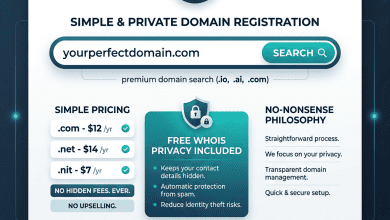
Domain transfer — the process of moving a domain name registration from one registrar to another — is a standard operation governed by ICANN (Internet Corporation for Assigned Names and Numbers) policies. Domain owners transfer domains for various legitimate reasons including better pricing at another registrar, superior management features, consolidating domains under a single registrar, dissatisfaction with current registrar support or interface, or taking advantage of specific features offered by alternative registrars. Understanding the transfer process, requirements, timing, and potential complications ensures smooth and seamless domain transitions without any service disruption.
This guide provides comprehensive coverage of the domain transfer process, explaining ICANN transfer policies, step-by-step transfer procedures, DNS management during transfers, common issues and solutions, and best practices for ensuring successful domain migrations. The information applies to standard gTLD transfers (.com, .net, .org, etc.) with notes on country-code TLD variations where applicable.
ICANN Transfer Policy Overview
ICANN’s Inter-Registrar Transfer Policy (IRTP) establishes the rules governing domain transfers between accredited registrars. Key policy provisions include: transfers must be initiated by the domain registrant or authorized administrative contact; the gaining registrar (receiving the domain) initiates the transfer process; the losing registrar (the current registrar) must not unreasonably refuse a valid transfer request; a valid authorization code (EPP code/auth code) is required; and transfers include one year of registration renewal at the gaining registrar’s transfer price.
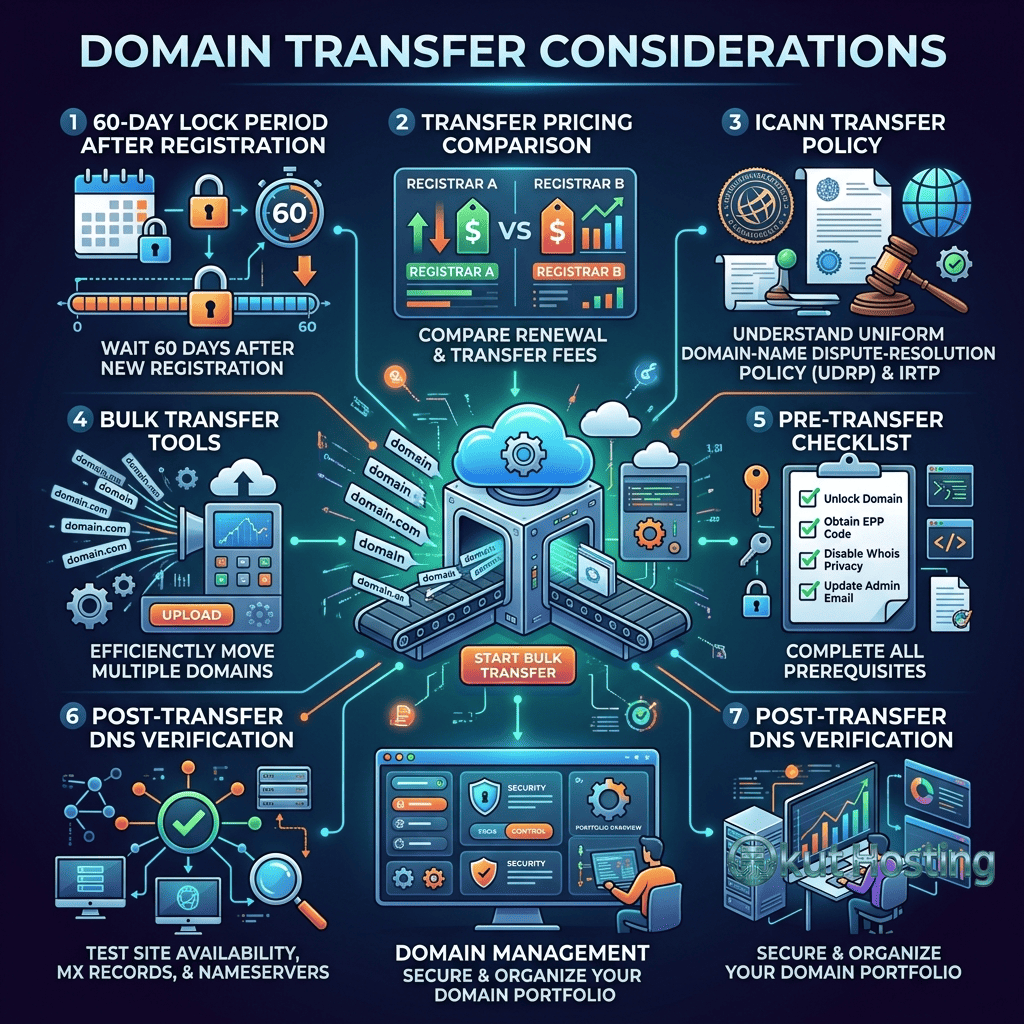
the IRTP also establishes important transfer restrictions: domains cannot be transferred within 60 days of initial registration; domains cannot be transferred within 60 days of a previous transfer; and the losing registrar may apply a 60-day transfer lock following a change of registrant (WHOIS contact change). These important restrictions prevent fraudulent transfers and ensure that domain ownership changes follow orderly procedures.
Pre-Transfer Preparation
Before initiating a domain transfer, several important preparation steps are essential for a smooth process. First, verify that the domain is eligible for transfer by confirming it was registered more than 60 days ago, has not been transferred within the last 60 days, and has not had a recent registrant change that triggered a transfer lock. Second, check that the domain’s administrative contact email address is current and accessible, as transfer authorization emails are sent to this address.
Third, ensure that the domain’s WHOIS information is accurate and accessible — if WHOIS privacy is enabled, determine whether the privacy service forwards transfer authorization emails or whether privacy needs to be temporarily disabled during the transfer. Fourth, verify that the domain’s registration is not expired, as expired domains may not be eligible for transfer through the standard ICANN process. Fifth, confirm that no pending disputes, legal holds, or registrar-imposed restrictions prevent the transfer.
Step-by-Step Transfer Process
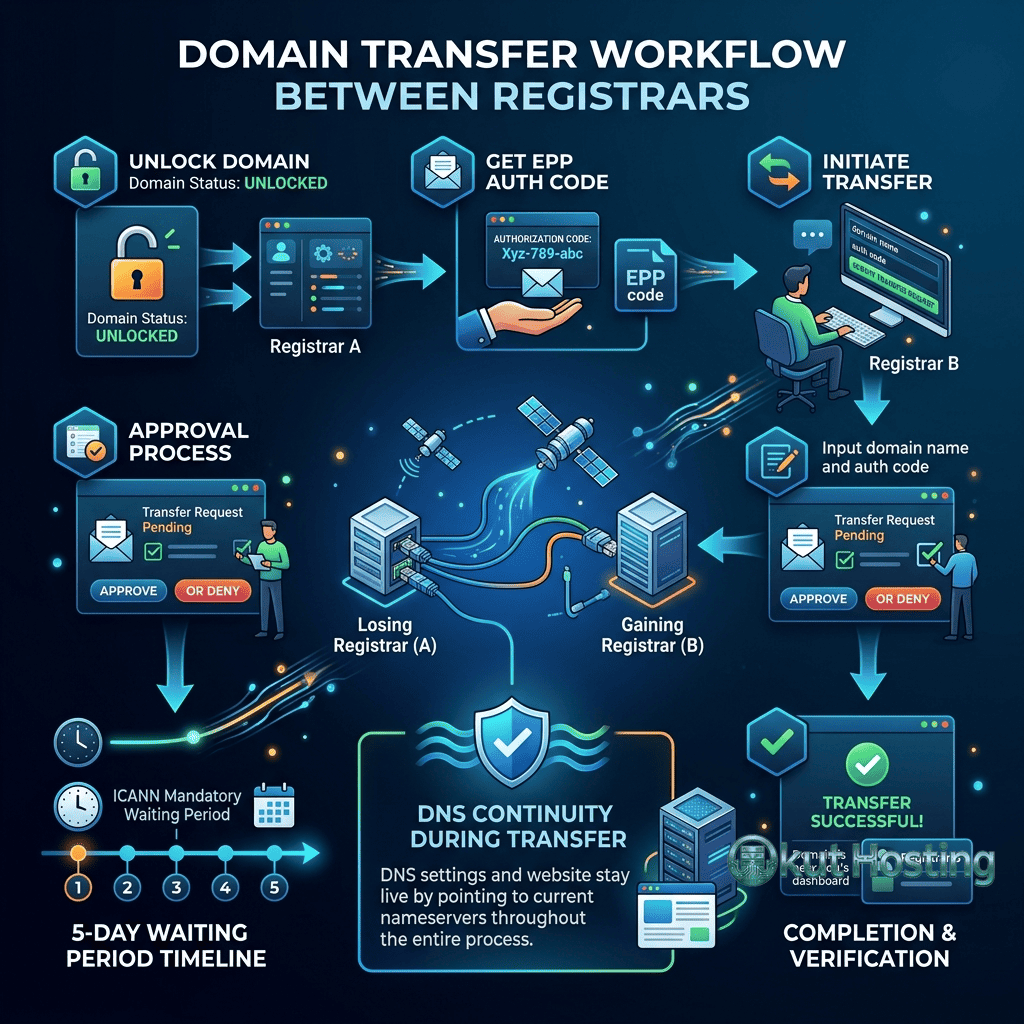
Step 1: Unlock the Domain
Most registrars apply a domain lock (registrar lock) by default to prevent unauthorized transfers. The domain must be unlocked through the current registrar’s management interface before a transfer can proceed. The unlock process typically involves navigating to the domain’s settings page and toggling the lock status from locked to unlocked.
Step 2: Obtain the Authorization Code
The authorization code (also called EPP code, auth code, or transfer key) is a unique security code assigned to each domain that must be provided to the gaining registrar to authorize the transfer. The authorization code is obtained from the current registrar, typically through the domain management interface, account settings, or by contacting customer support. Some registrars display the code directly in the interface, while others email it to the administrative contact.
Step 3: Initiate Transfer at the Gaining Registrar
At the new registrar where the domain is being transferred to, initiate the transfer process by entering the domain name and the authorization code. The gaining registrar will verify the authorization code and initiate the transfer request with the domain registry. Payment for the transfer (which includes one year of registration renewal) is typically required at this initial stage.
Step 4: Confirm the Transfer
An authorization email is sent to the domain’s administrative contact email address requesting explicit confirmation of the transfer. This email typically contains a link that must be clicked to approve the transfer. If the transfer is not explicitly approved, it will proceed automatically after approximately 5 days. Some registrars also send a notification to the losing registrar’s administrative interface or account email.
Step 5: Wait for Processing
After authorization, the transfer typically takes 5-7 days to complete. During this processing period, the domain continues to function normally and serve visitors with existing DNS settings. The losing registrar has a window to object to the transfer (though registrar objections are only valid for specific ICANN policy reasons). Once the transfer completes, the domain appears in the gaining registrar’s account for management.
DNS Management During Transfer
Understanding DNS behavior during transfers is critical for preventing website downtime. During a standard registrar transfer, DNS settings typically remain unchanged — the domain continues resolving to the same IP addresses and services throughout the transfer process. However, the DNS management interface transitions from the losing registrar to the gaining registrar upon transfer completion.
Best practice for DNS during transfer: before initiating the transfer, document all current DNS records (A, CNAME, MX, TXT, NS records) by taking screenshots or exporting the DNS configuration from the current registrar. After the transfer completes, verify that all DNS records are correctly configured at the gaining registrar. If using the registrar’s DNS hosting (rather than external DNS like Cloudflare), DNS records may need to be recreated at the new registrar.
For zero-downtime transfers, consider pointing the domain to an external DNS provider (such as Cloudflare’s free DNS) before initiating the transfer. Since external DNS operates independently of the registrar, changing registrars does not affect DNS resolution. After the transfer completes, the domain continues using the external DNS service regardless of which registrar manages the underlying registration.
Email Service Considerations
Email services associated with the domain require careful attention during transfers. If email hosting is provided by the current registrar (through the registrar’s email service), transferring the domain may affect email delivery. MX records that point to the current registrar’s email servers must be updated if the new registrar does not automatically replicate these settings.
For email hosted through third-party providers (Google Workspace, Microsoft 365, external email hosts), the registrar transfer typically does not affect email service delivery as long as MX records remain correctly configured. Verifying MX record configuration after transfer completion ensures uninterrupted email delivery.
Common Transfer Issues
Authorization Code Not Working
Authorization codes can fail if they have expired (some registrars set expiration periods), if they contain whitespace or special characters that are not correctly copied, or if the code has been regenerated after the initial code was provided. Regenerating a fresh authorization code from the current registrar’s management interface typically resolves this issue.
Transfer Rejected by Losing Registrar
Losing registrars may reject transfers for valid reasons including: the domain is within the 60-day post-registration lock period; the domain is within the 60-day post-transfer lock period; a transfer lock was applied after a recent registrant change; the domain has a pending legal dispute; or there are outstanding payment obligations on the account. Contacting the losing registrar’s support team to identify the specific rejection reason enables addressing the issue.
Administrative Contact Email Issues
If the administrative contact email is no longer accessible, transfer authorization cannot be confirmed through email. Updating the administrative contact email before initiating the transfer resolves this issue, though note that updating the registrant contact may trigger a new 60-day transfer lock at some registrars.
WHOIS Privacy Interference
Some WHOIS privacy services substitute the registrant’s email with a privacy service address that may not properly forward transfer authorization emails. Temporarily disabling WHOIS privacy before initiating the transfer ensures that authorization emails reach the actual domain owner. WHOIS privacy can be re-enabled at the gaining registrar after transfer completion.
Transfer Timing Considerations
Optimal transfer timing considers several important factors: avoid transferring domains close to their expiration date, as expired domains may not be transferable through the standard process; plan transfers during low-traffic business periods to minimize impact of any potential DNS issues; allow sufficient time for the 5-7 day transfer processing window; and consider that the transfer includes one year of renewal, so timing transfers near the existing expiration date maximizes the value of the included renewal year.
Bulk Domain Transfers
For portfolio owners transferring multiple domains between registrars, many registrars provide bulk transfer tools that streamline the multi-domain transfer process. Bulk transfers enable submitting multiple domain names and authorization codes simultaneously, processing all transfers as a batch rather than individual operations. Bulk transfer pricing may include attractive volume discounts at some registrars.
Country-Code TLD Transfer Variations
Country-code TLD (.co.uk, .de, .ca, .au) transfers may follow different procedures than generic TLD transfers. Some country-code registries have their own transfer policies that differ from ICANN’s IRTP. For example, .uk transfers use a tag-change system rather than authorization codes, .de transfers may require additional verification, and some country-code TLDs have different lock periods or authorization requirements. When transferring country-code domains, consult both the losing and gaining registrars for specific procedural requirements.
Cost Analysis of Domain Transfers
Domain transfers include one year of registration renewal at the gaining registrar’s transfer price. This renewal year is added to the domain’s existing expiration date, meaning that no registration time is lost during the transfer. The effective cost of the transfer is the difference between the gaining registrar’s transfer price and what would have been paid to renew at the current registrar. If the gaining registrar’s transfer and renewal price is lower than the current registrar’s renewal price, the transfer itself generates savings. For domain portfolio owners managing multiple domains, cumulative savings from transferring to a lower-cost registrar can be very significant over time.
SSL Certificate Considerations
SSL certificates are independent of domain registrar — they are issued by Certificate Authorities and configured on the hosting server. Transferring a domain registration between registrars does not affect existing SSL certificates. However, if the current registrar provides SSL certificates as part of their service (some registrars include free SSL), the SSL certificate may not transfer with the domain. For standard hosting configurations using Let’s Encrypt or Cloudflare’s free SSL, registrar transfers have no impact on SSL certificate status. Verify SSL certificate functionality after transfer completion to ensure HTTPS continues operating correctly.
Downtime Prevention Strategies
Zero-downtime domain transfers are achievable with proper planning. The most effective strategy involves using a third-party DNS provider (Cloudflare, Route 53, Google Cloud DNS) as an intermediary. Before initiating the transfer, point the domain’s nameservers to the third-party DNS provider and configure all DNS records there. Since the DNS service operates independently of the registrar, the registrar transfer does not affect DNS resolution. After the transfer completes, the domain continues using the third-party DNS provider seamlessly, with the new registrar managing only the registration rather than DNS.
Transfer Dispute Resolution
ICANN provides formal dispute resolution mechanisms for contested domain transfers. The Transfer Dispute Resolution Policy (TDRP) enables registrars and registrants to challenge transfers that occurred improperly. If a domain is transferred without the registrant’s authorization, the registrant can file a complaint with ICANN or initiate a dispute through the losing registrar. ICANN’s TDRP process can reverse unauthorized transfers and restore domain registration to the legitimate registrant. The dispute process typically requires evidence of unauthorized transfer, including comprehensive documentation of the domain’s legitimate ownership and the circumstances of the disputed transfer.
GDPR Impact on Transfers
GDPR (General Data Protection Regulation) has affected the domain transfer process by restricting access to WHOIS registration data. Under GDPR, registrant contact information may be redacted in WHOIS records, which can complicate the transfer verification process. However, registrars are required to maintain contact mechanisms for legitimate transfer operations. The transfer authorization process works through established registrar-to-registrant communication channels regardless of WHOIS data availability, ensuring that GDPR compliance does not prevent legitimate domain transfers.
Registrar-Specific Transfer Guides
Each registrar has specific interface locations and procedures for unlocking domains and obtaining authorization codes. For GoDaddy, the authorization code and domain lock settings are accessed through the Domain Settings page. For Namecheap, the Authorization Code and Domain Lock are available in the Domain List management area. For Cloudflare Registrar, transfer settings are managed through the domain’s Overview page in the Cloudflare dashboard. For registrar-specific transfer procedures, consulting the current registrar’s official knowledge base documentation or contacting their customer support team directly provides the most accurate and up-to-date procedural guidance.
Automated Transfer Monitoring
Some registrars provide automated transfer monitoring features that alert domain owners to incoming transfer requests, enabling prompt and informed approval or rejection of transfer attempts. These important notifications serve as a critical security measure, alerting owners to unauthorized transfer attempts. Enabling email notifications for domain-related activities and regularly monitoring registrar communications ensures that domain owners remain aware of any transfer activity affecting their domains.
Hidden Fees and Transfer Cost Transparency
Reputable registrars charge a single, clearly stated transfer fee that includes one year of domain renewal. Domain owners should verify that no additional hidden fees are applied during the transfer process, including processing fees, administration fees, or service activation charges. Some registrars offer transfer-in promotions with discounted transfer pricing, which provides additional savings when migrating domains. The transfer price should be confirmed before initiating the transfer to avoid unexpected charges during the process.
Post-Transfer Checklist
After a domain transfer completes, verify the following: all DNS records are correctly configured and the website is accessible; MX records are correct and email is functioning; WHOIS privacy is enabled if desired; auto-renewal is configured to prevent accidental expiration; domain lock is re-enabled to prevent unauthorized transfers; and all administrative contact information is current. This post-transfer verification ensures that the domain is fully functional and properly secured at the new registrar.
Transfer vs Nameserver Change
Domain transfer and nameserver change are different operations that are sometimes confused. A domain transfer moves the domain registration between registrars — changing who manages the domain registration, renewal, and administrative settings. A nameserver change simply points the domain’s DNS to a different DNS provider without changing the registrar — the domain remains registered at the same registrar but DNS is managed elsewhere. Users who are satisfied with their current registrar but want better DNS management (Cloudflare’s DNS, for example) only need a nameserver change, not a full domain transfer.
Summary
Domain transfer is a well-defined and standardized process governed by established ICANN policies that enables domain owners to move their registrations between registrars. Successful transfers require proper preparation (unlocking the domain, obtaining authorization codes, verifying contact information), understanding DNS implications, and following the standard well-defined 5-step process. By documenting DNS configurations, planning transfer timing, and completing the post-transfer verification checklist, domain owners can ensure seamless transitions between registrars without website downtime or service disruption.
Information discussed in this guide reflects standard ICANN transfer policies and common registrar practices. Specific procedures may vary by registrar and TLD. Please verify current procedures with your specific registrar. Okut Hosting is an independent review platform with no affiliate relationships with any company mentioned in this article.
For related guides, see our GoDaddy vs Namecheap comparison, our DNS management basics, and our domain lock settings guide.