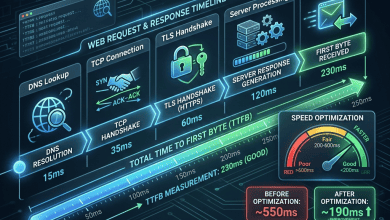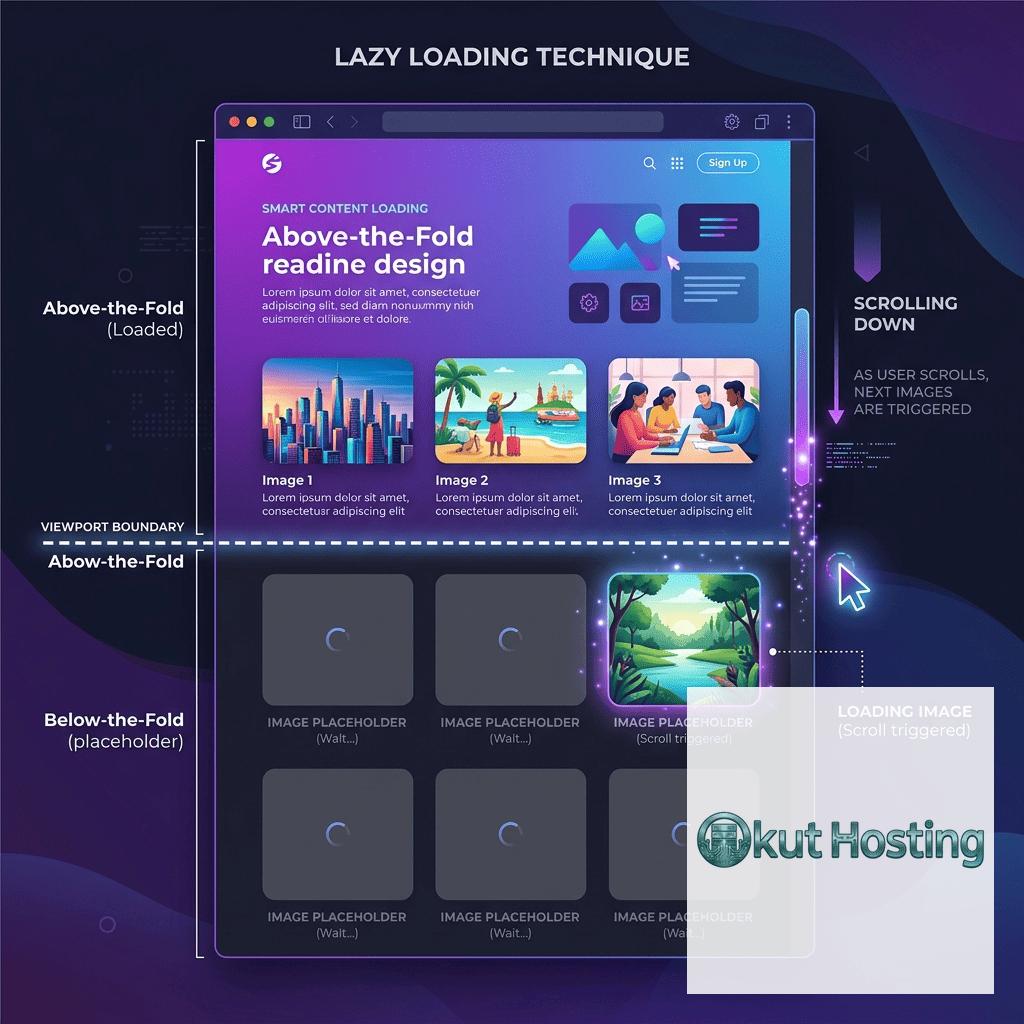
Lazy loading is a widely-adopted performance optimization technique that defers the loading of non-critical resources until they are needed — typically when they are about to enter the browser’s viewport as the user scrolls. By loading only the resources immediately visible to the user on initial page load, lazy loading reduces initial page weight, decreases Time to Interactive, improves Core Web Vitals scores, reduces bandwidth consumption for users who don’t scroll through the entire page, and decreases server load by serving fewer resources for each page view.
This guide covers lazy loading implementation comprehensively, explaining native browser lazy loading, the Intersection Observer API, image and video lazy loading techniques, iframe lazy loading, WordPress implementation, Core Web Vitals considerations, advanced loading patterns, and best practices for effective lazy loading deployment. The information applies across all modern web platforms and content management systems.
Native Browser Lazy Loading
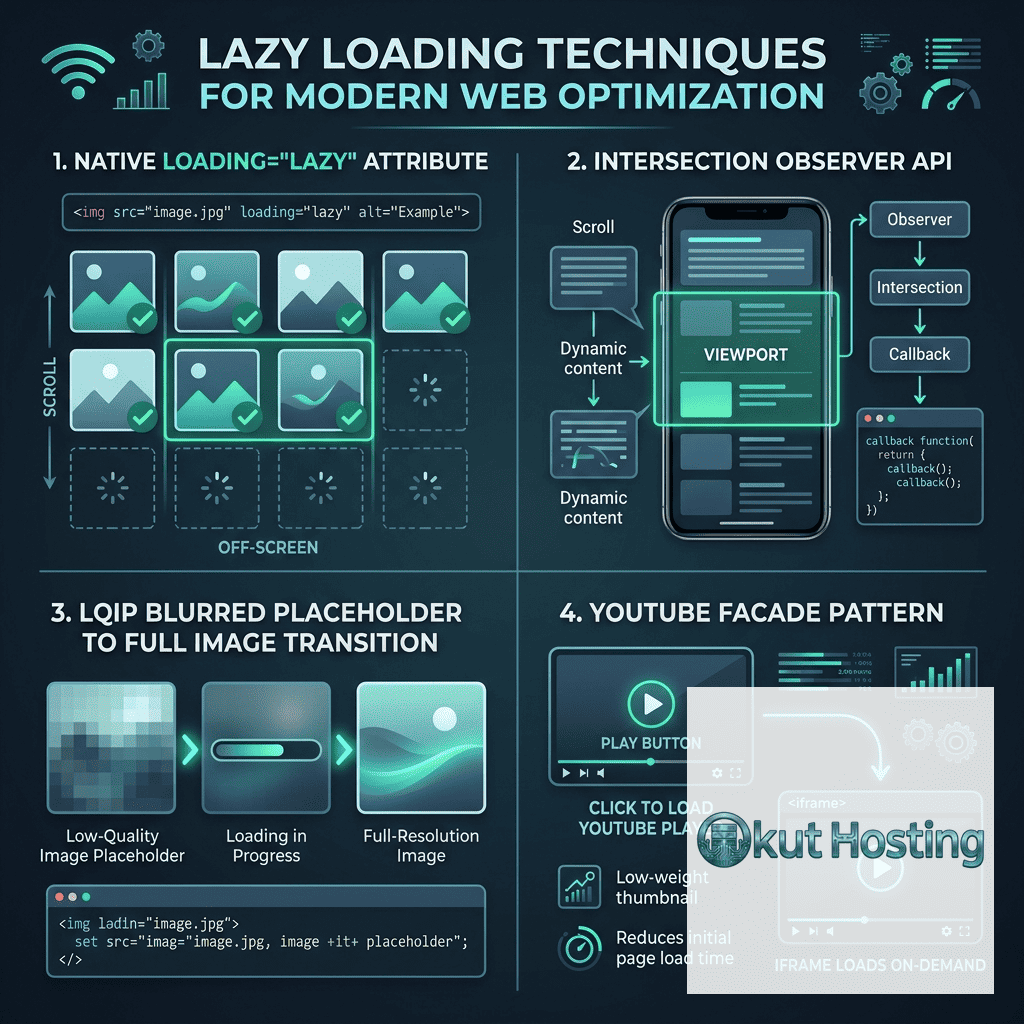
HTML’s native lazy loading attribute (loading=”lazy”) provides the simplest lazy loading implementation, requiring no JavaScript. Adding loading=”lazy” to img and iframe elements instructs the browser to defer loading until the element approaches the viewport. Browser support for native lazy loading now exceeds 95% of global web traffic (supported in Chrome, Firefox, Edge, Safari, and Opera), making it a practical production-ready solution.
Native lazy loading implementation is straightforward: add loading=”lazy” to img elements that appear below the initial viewport; include width and height attributes to prevent layout shifts during loading; and avoid adding loading=”lazy” to above-the-fold images that should load immediately. The browser determines the exact loading threshold (distance from viewport at which loading begins) based on network conditions and device capabilities, providing intelligent loading behavior without developer configuration.
When NOT to Lazy Load
Importantly, not all content should be lazy loaded. Above-the-fold content — particularly the LCP (Largest Contentful Paint) element — must load immediately for optimal Core Web Vitals performance. Lazy loading the LCP element delays its rendering, worsening the LCP metric. Content that should NOT be lazy loaded includes: hero images and banner images visible without scrolling; the first few images in a content feed; critical background images above the fold; and any element that contributes to the Largest Contentful Paint metric. Identifying above-the-fold content requires testing across different viewport sizes (desktop, tablet, mobile).
Intersection Observer API
The Intersection Observer API provides a JavaScript-based approach to lazy loading with more control than native lazy loading. Intersection Observer watches target elements and triggers callbacks when elements enter or exit the viewport (or a defined root element). For lazy loading, Intersection Observer enables: custom loading thresholds (rootMargin) that determine how far from the viewport loading begins; loading callbacks that handle image source switching, animation triggering, or content initialization; and observation of any element type, not just images and iframes.
A typical Intersection Observer lazy loading implementation: creates an observer with a root margin (e.g., 200px below the viewport) that triggers loading before elements become visible; observes all lazy-loadable elements; on intersection, replaces data-src attributes with actual src attributes, triggering image download; and unobserves elements after loading to prevent repeated triggering. This approach provides reliable lazy loading with fallback capability for the small percentage of browsers without Intersection Observer support.
Image Lazy Loading
Images are the most common lazy loading target because they typically represent the largest portion of page weight. Image lazy loading patterns include:
Native lazy loading: Adding loading=”lazy” to img elements — the simplest and most performant approach with excellent browser support.
JavaScript-based lazy loading: Using Intersection Observer with data-src attributes for images requiring custom loading behavior, animation effects, or fallback support.
Low-Quality Image Placeholder (LQIP): Loading a tiny, heavily compressed placeholder image immediately, replacing it with the full image when it approaches the viewport. LQIP provides visual feedback during loading while deferring full image download.
Dominant Color Placeholder: Displaying the image’s dominant color as a background while the full image loads, providing visual context without loading any image data initially.
BlurHash Placeholder: Using BlurHash encoding to display a blurred preview of the image during loading, providing more visual context than solid color placeholders with minimal data overhead.
Video Lazy Loading
Video elements consume significant bandwidth and should be lazy loaded to prevent unnecessary data consumption. Video lazy loading approaches include: using the preload=”none” attribute to prevent automatic video data loading; loading video poster images immediately while deferring video data until user interaction; using Intersection Observer to load video data when the video element approaches the viewport; and implementing facade patterns for embedded videos (YouTube, Vimeo) that display a static thumbnail until the user clicks to play.
Iframe Lazy Loading
Iframes (embedded maps, social media posts, third-party widgets) are excellent lazy loading candidates because they often load substantial resources. Native lazy loading (loading=”lazy”) is supported for iframe elements. Lazy loading iframes prevents embedded content from consuming bandwidth and CPU resources until the user scrolls to the embedded content. YouTube embeds, Google Maps embeds, and social media embeds are common iframe lazy loading targets that provide significant performance improvement when deferred.
WordPress Lazy Loading
WordPress 5.5 introduced native lazy loading by automatically adding loading=”lazy” to all img elements in post content. WordPress 5.9 improved this by excluding the first content image from lazy loading to protect LCP performance. Additionally, WordPress lazy loading plugins provide enhanced functionality: WP Rocket provides automatic lazy loading for images, iframes, and videos with YouTube facade support; a3 Lazy Load provides configurable lazy loading with animation effects; and Perfmatters provides granular lazy loading control with exclusion options.
WordPress themes should ensure that above-the-fold images (featured images, header images, logo) are excluded from lazy loading. Theme developers can use the wp_lazy_loading_enabled filter and wp_img_tag_add_loading_attr filter to control lazy loading behavior for specific images.
Core Web Vitals Impact
Lazy loading directly impacts Core Web Vitals metrics. Positive impacts include: reduced initial page weight improving Time to First Byte and LCP for properly configured pages; reduced main thread work improving INP by loading fewer resources initially; and reduced data consumption improving performance on bandwidth-limited connections. Negative impacts (when misconfigured) include: delayed LCP when above-the-fold images are lazy loaded; CLS if lazy loaded images don’t have explicit dimensions; and poor user experience if loading thresholds are too aggressive (images not loaded before entering viewport).
CSS Background Image Lazy Loading
CSS background images cannot use the native loading=”lazy” attribute. Lazy loading CSS backgrounds requires JavaScript-based approaches: using Intersection Observer to add a CSS class that sets the background-image when the element approaches the viewport; or using the content-visibility: auto CSS property which allows the browser to skip rendering (and resource loading) for off-screen elements. The content-visibility approach provides CSS-only lazy loading behavior for sections of the page, though browser support and behavior specifics should be verified for production use.
Infinite Scroll and Virtual Lists
Lazy loading is essential for infinite scroll implementations (social feeds, product listings) where content loads continuously as the user scrolls. Intersection Observer monitors a sentinel element at the bottom of the content list, triggering new content loading when the sentinel enters the viewport. Virtual list implementations (react-window, react-virtualized) take this further by rendering only the visible items in a long list, unmounting items that scroll out of view. These patterns enable handling lists with thousands of items without loading all content upfront.
JavaScript Module Lazy Loading
Beyond images and media, lazy loading principles apply to JavaScript modules. Dynamic imports (import()) enable loading JavaScript code on demand rather than including it in the initial bundle. Common JavaScript lazy loading patterns include: route-based code splitting (loading page-specific JavaScript only when the route is navigated); component-based lazy loading (loading heavy components like charts, editors, maps only when they’re needed); and interaction-based loading (loading functionality only when the user interacts with a specific feature). Framework-specific implementations include React.lazy(), Vue’s async components, and Angular’s lazy-loaded modules.
Accessibility Considerations
Lazy loading must maintain accessibility for all users. Lazy loaded images must retain meaningful alt attributes for screen reader accessibility. Content that loads on scroll should not trap keyboard navigation or create confusion for screen reader users. Sufficient loading buffers ensure content is available before users reach it, preventing empty gaps that confuse users with cognitive disabilities. Print stylesheets should trigger full content loading to ensure printed pages include all images and content.
Performance Measurement
Measuring lazy loading effectiveness involves comparing page metrics with and without lazy loading. Key measurements include: initial page weight reduction (total bytes loaded before user interaction); initial request count reduction; LCP timing (should improve if lazy loading is properly excluding above-the-fold images); Speed Index improvement (visual loading speed); and Total Blocking Time reduction. PageSpeed Insights, GTmetrix, and WebPageTest all report metrics affected by lazy loading implementation, enabling validation of lazy loading’s performance impact.
Responsive Image Lazy Loading
When combining lazy loading with responsive images (srcset), the data attributes approach requires careful implementation. Data-src, data-srcset, and data-sizes attributes store the responsive image information, which is transferred to actual src, srcset, and sizes attributes when the Intersection Observer triggers loading. Native lazy loading (loading=”lazy”) works automatically with srcset and sizes attributes, making native lazy loading the recommended approach for responsive images. The browser handles selecting the appropriate image variant based on viewport size and device pixel ratio, with lazy loading deferring the selection and download until the image approaches the viewport.
Third-Party Embed Facades
Third-party embeds (YouTube videos, Google Maps, Twitter posts, Instagram embeds) load significant JavaScript and resources that impact page performance. Facade patterns display a static representation (thumbnail, screenshot) of the embed until the user interacts, then replace the facade with the actual embed on click or hover. The lite-youtube-embed web component provides a popular facade for YouTube embeds that loads the full YouTube player only when the user clicks play. Similar facades exist for Vimeo, Google Maps, and other common embeds. Well-implemented facades dramatically reduce the performance impact of embedded content while maintaining functionality for users who interact with the embeds.
Lazy Loading and SEO
Search engine crawlers handle lazy loading differently than browsers. Googlebot executes JavaScript and can discover content loaded through Intersection Observer and native lazy loading. However, lazy loaded content may receive lower crawl priority or take longer to be indexed. SEO considerations for lazy loading include: ensuring that lazy loaded content is accessible to crawlers (not blocked by robots.txt or requiring authentication); using native lazy loading which Googlebot handles natively; including noscript fallbacks for critical images that should be indexed; and verifying through Google Search Console that lazy loaded content is properly indexed.
Network-Aware Lazy Loading
The Network Information API (navigator.connection) enables adapting lazy loading behavior based on network conditions. On fast connections (4G, WiFi), lazy loading thresholds can be more aggressive (loading images closer to the viewport) or disabled entirely, prioritizing content availability. On slow connections (2G, 3G), more conservative lazy loading reduces data consumption by loading fewer images. Data saver mode detection (navigator.connection.saveData) enables serving lower-quality images or reducing lazy loading preload distances for users who have explicitly requested data conservation.
Lazy Loading Component Libraries
Framework-specific lazy loading libraries significantly simplify implementation for different technology stacks. React: react-lazyload, react-lazy-load-image-component, and React.lazy() for component-level lazy loading. Vue: vue-lazyload provides directive-based image lazy loading. Angular: @angular/core provides built-in lazy loading for routes and components. Framework-agnostic: lazysizes provides comprehensive lazy loading with extensive plugin support; lozad.js provides lightweight Intersection Observer-based lazy loading; and vanilla-lazyload provides a configurable vanilla JavaScript implementation.
Testing Lazy Loading Implementation
Verifying lazy loading implementation involves several testing approaches: scrolling through the page while monitoring the Network panel in browser DevTools to confirm that images load on demand rather than initially; using Lighthouse audits that check for off-screen image optimization; verifying that above-the-fold images are NOT lazy loaded (checking for loading=”lazy” on LCP candidates); testing at different viewport sizes to ensure lazy loading thresholds work across devices; and testing with JavaScript disabled to verify noscript fallbacks function correctly. Chrome DevTools’ Performance panel shows resource loading timing, enabling verification that lazy loaded resources load at the expected scroll positions.
Content Visibility and contain-intrinsic-size
The CSS content-visibility: auto property provides automatic rendering optimization that functions similarly to lazy loading at the CSS level. When applied to page sections, content-visibility: auto allows the browser to skip rendering for off-screen sections, including deferring image decoding and layout computation. The contain-intrinsic-size property specifies estimated dimensions for skipped sections, preventing layout shifts when sections are rendered on scroll. This CSS-only approach to deferred rendering complements element-level lazy loading and can provide significant performance improvements for long pages with many sections.
Error Handling for Lazy Loading
Robust lazy loading implementations should handle error scenarios gracefully. If a lazy loaded image fails to download (network error, 404), the implementation should: display a fallback image or placeholder indicating the loading failure; provide retry capability for transient network errors; log errors for monitoring and debugging; and avoid infinite retry loops that could consume bandwidth. Proper error handling ensures that lazy loading failures don’t leave blank spaces or broken image icons visible to users.
Advanced Lazy Loading Patterns
Advanced lazy loading patterns include: priority hints (fetchpriority=”high” and fetchpriority=”low”) for signaling resource loading priority to the browser; predictive loading using user behavior signals to pre-load content likely to be needed next; conditional lazy loading based on network conditions (loading more aggressively on fast connections); and service worker-based prefetching that loads resources in the background during idle time. These patterns optimize the balance between loading performance and content availability.
Lazy Loading Best Practices Checklist
A comprehensive lazy loading implementation checklist includes: use native loading=”lazy” for images and iframes as the default approach; never lazy load above-the-fold images or the LCP element; always include explicit width and height attributes on lazy loaded images to prevent CLS; use appropriate loading thresholds that preload content before it enters the viewport; implement fallback content for browsers without lazy loading support; exclude critical resources from lazy loading that are needed for initial rendering; use facade patterns for heavy third-party embeds like YouTube and Google Maps; test lazy loading on mobile devices where the viewport is smaller and images enter the viewport sooner; verify that search engines can access lazy loaded content through crawl testing; and monitor Core Web Vitals after implementing lazy loading to confirm positive performance impact without negative side effects on LCP or CLS metrics.
Summary
Lazy loading is a high-impact performance optimization that reduces initial page load time by deferring non-critical resource loading until resources approach the viewport. Native browser lazy loading (loading=”lazy”) provides the simplest implementation with excellent browser support, while Intersection Observer enables custom loading behavior for advanced requirements. Effective lazy loading requires careful exclusion of above-the-fold content (particularly LCP elements), explicit image dimensions to prevent CLS, and appropriate loading thresholds that ensure content is available before users reach it. WordPress provides built-in lazy loading with plugin options for enhanced control, and lazy loading principles extend well beyond images to video, iframes, JavaScript modules, and CSS backgrounds.
Techniques and browser features discussed in this guide reflect current web standards. Browser support and behavior specifications may evolve. Okut Hosting is an independent review platform with no affiliate relationships with any company mentioned in this article.
For related guides, see our image optimization guide, our Core Web Vitals guide, and our WordPress caching plugins guide.