Data protection through comprehensive backup strategies is one of the most critical responsibilities in VPS hosting management. Server failures, security breaches, ransomware attacks, accidental file deletions, database corruption, and configuration errors can all result in data loss that ranges from inconvenient to catastrophic. A well-designed backup strategy provides the ability to recover from any data loss scenario quickly and completely, protecting both business operations and the digital assets that depend on VPS-hosted infrastructure.
This guide examines cloud backup strategies for VPS hosting environments, covering backup types, scheduling practices, storage options, encryption, testing procedures, disaster recovery planning, WordPress-specific backup approaches, and cost optimization. The analysis provides practical, actionable guidance for VPS administrators implementing data protection strategies across cloud platforms including DigitalOcean, Linode, Vultr, AWS, Google Cloud, and Azure.
Understanding Backup Types
Full Backups
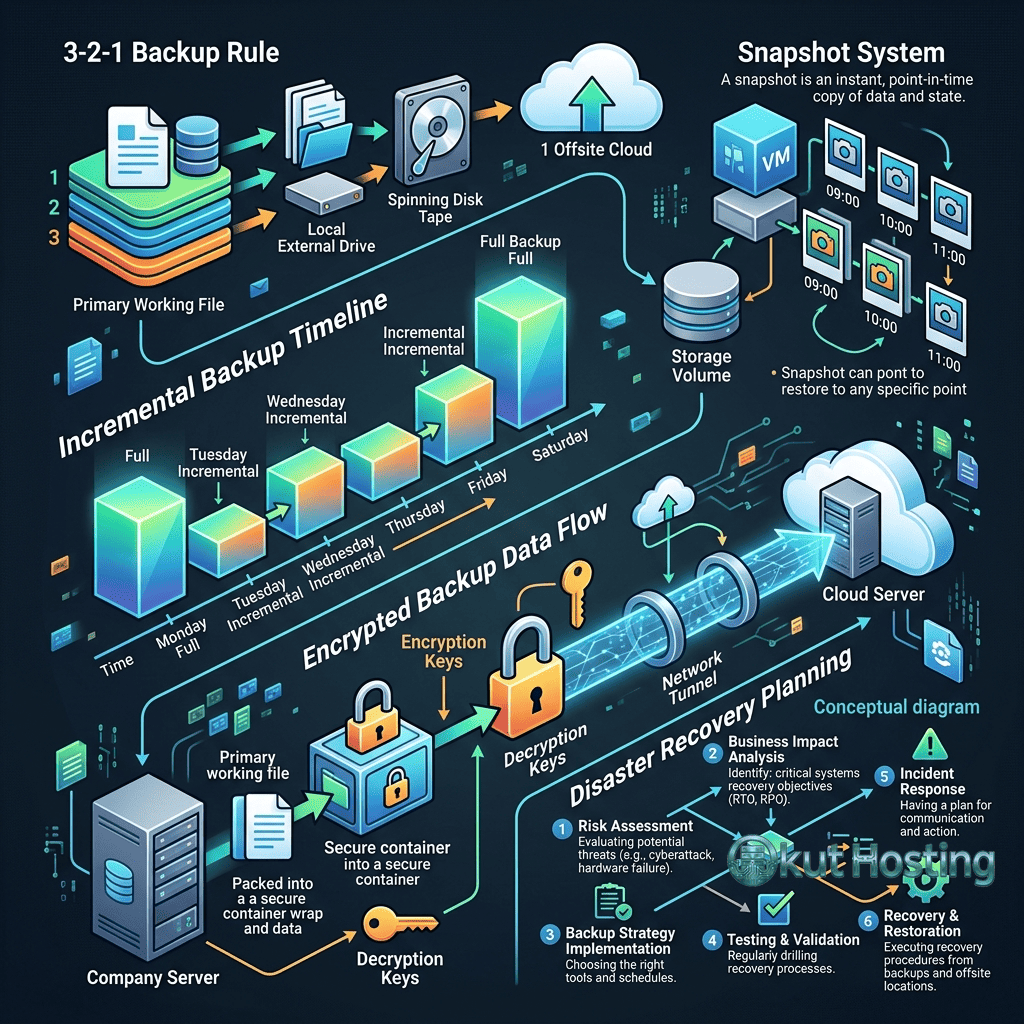
Full backups create a complete copy of all data, configurations, and system state at the time of backup execution. Full backups provide the simplest restoration process — a single backup file contains everything needed to rebuild the server completely. However, full backups consume the most storage space and take the longest to execute, as the entire data set is copied regardless of whether individual files have changed since the previous backup.
Incremental Backups
Incremental backups copy only the data that has changed since the most recent backup (whether full or incremental). This approach dramatically reduces backup time and storage consumption compared to full backups. Restoration from incremental backups requires the most recent full backup plus all subsequent incremental backups applied in sequence. Modern backup tools like Restic and Borg implement incremental backup with deduplication, providing storage efficiency while simplifying the restoration process.
Differential Backups
Differential backups copy all data that has changed since the most recent full backup. Unlike incremental backups that track changes since any previous backup, differential backups always reference the last full backup. This approach provides faster restoration than incremental backups (requiring only the full backup plus the latest differential backup) while consuming more storage than pure incremental approaches.
Snapshot Backups
Cloud platform snapshots create point-in-time images of entire server volumes at the block storage level. Snapshots capture the complete server state including the operating system, installed software, configurations, and user data. Most cloud platforms (DigitalOcean, Linode, Vultr, AWS, Azure, Google Cloud) provide snapshot functionality through their management consoles and APIs. Snapshots enable rapid server restoration and cloning but are typically stored within the same cloud platform, which does not protect against platform-level failures.
The 3-2-1 Backup Rule
The 3-2-1 backup rule provides a foundational framework for backup strategy design: maintain at least 3 copies of important data, stored on at least 2 different storage media types, with at least 1 copy stored in a geographically separate location (offsite). Applying this rule to VPS hosting means: the live server data counts as one copy; a backup stored on the same cloud platform (snapshot or attached storage) counts as a second copy on the same media type; and a backup stored on a different cloud platform, object storage provider, or physical location counts as the essential offsite third copy.
The offsite component is the most critical element of the 3-2-1 rule. Without offsite backup, a cloud platform account compromise, data center incident, or provider-level failure could destroy both the live data and the same-platform backup simultaneously. Offsite backup storage options include: S3-compatible object storage on a different provider; backup-specific services like Backblaze B2; different cloud provider storage; and physical backup media stored in a separate location.
Backup Storage Options
Object Storage (S3-Compatible)
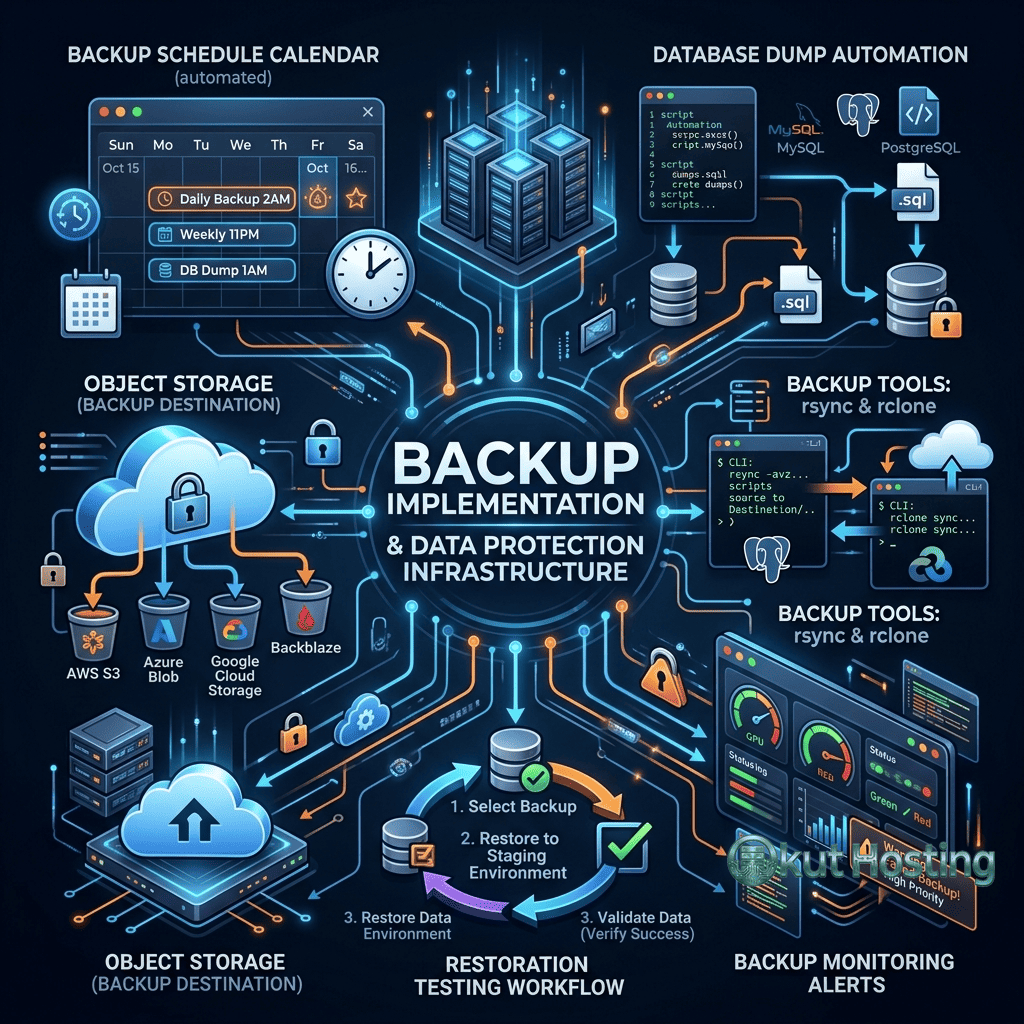
S3-compatible object storage is the most popular destination for VPS backups. Providers include: AWS S3, DigitalOcean Spaces, Linode Object Storage, Vultr Object Storage, Backblaze B2, Wasabi, MinIO (self-hosted), and Cloudflare R2. Object storage provides scalable, durable, and cost-effective storage optimized for backup workloads. S3 API compatibility ensures that backup tools supporting S3 (Restic, Rclone, Duplicity) work across all compatible providers.
Block Storage Volumes
Attaching block storage volumes to VPS instances provides local backup storage with fast I/O performance. Block storage backups provide rapid backup and restoration but are limited to the same data center and cloud platform as the VPS, providing no geographic or platform separation. Block storage is suitable for rapid-access backup copies that supplement rather than replace offsite backup storage.
Remote Server Backup (SFTP/SSH)
Backing up to a remote server via SFTP or SSH provides offsite backup storage using a VPS or dedicated server in a different location. Rsync over SSH provides efficient incremental file synchronization. This approach provides geographic separation and platform independence but requires managing an additional server for backup storage.
Backup Tools for VPS
Restic
Restic provides encrypted, deduplicated backup with support for local storage, SFTP, S3, and multiple cloud storage backends. Restic’s deduplication eliminates redundant data across backups, significantly reducing storage consumption. AES-256 encryption protects backup data confidentiality. Snapshot-based management simplifies backup browsing and selective file restoration. Restic’s combination of security, efficiency, and multi-backend support makes it one of the most recommended backup tools for VPS environments.
BorgBackup
BorgBackup (Borg) provides encrypted, deduplicated backup with high compression ratios. Borg’s deduplication and compression achieve excellent storage efficiency, often reducing backup storage requirements by 50-80% compared to uncompressed full backups. Borg operates over SSH, backing up to any server accessible via SSH connection. BorgBase provides managed Borg backup hosting with append-only repositories for ransomware protection.
Rclone
Rclone provides file synchronization to over 40 cloud storage providers including S3, Google Drive, Dropbox, Azure Blob Storage, and Backblaze B2. Rclone’s broad provider support makes it versatile for backup workflows that target diverse storage destinations. Rclone supports encryption, bandwidth limiting, and scheduled synchronization. While Rclone provides file-level backup and synchronization, it does not provide the deduplication and snapshot management features of Restic or Borg.
Duplicity
Duplicity provides encrypted incremental backup using the rsync algorithm for efficient bandwidth usage and GPG encryption for data confidentiality. Duplicity supports numerous storage backends including local storage, SFTP, S3, Google Cloud Storage, and Azure Blob Storage. The tool creates compressed, encrypted tar volumes that can be stored on any accessible storage destination. Duplicity’s mature codebase and extensive backend support make it a reliable choice for automated VPS backup workflows.
Cloud Platform Backup Services
Most cloud platforms provide integrated backup services. DigitalOcean Backups create weekly automated server images with four-week retention. Linode Backups provide daily, weekly, and bi-weekly backup schedules. Vultr provides automated backup with configurable schedules. AWS provides EBS snapshots, AMIs, and AWS Backup for centralized backup management. These platform-integrated backups provide convenient same-platform backup but should be supplemented with offsite copies that protect against platform-level failures or account compromise.
The convenience of platform-integrated backups makes them valuable as one layer of a multi-layer backup strategy. However, relying exclusively on platform backups violates the 3-2-1 rule’s requirement for storage diversity and geographic separation. The most robust backup strategies combine platform-integrated backups for rapid recovery with offsite backups for catastrophic scenario protection.
Backup Scheduling
Backup scheduling determines how frequently backups execute and how many backup versions are retained. Common scheduling approaches include: daily full backups with 7-day retention for simple environments; weekly full backups with daily incremental backups and 30-day retention for balanced protection; and continuous database backup with binary log shipping for real-time data protection. The appropriate schedule depends on the acceptable data loss window (Recovery Point Objective / RPO) — the maximum amount of data that can be lost without unacceptable business impact.
Automated scheduling through cron jobs or systemd timers ensures backup consistency without manual execution. Backup automation should include execution monitoring that alerts administrators when backups fail, as undetected backup failures leave the environment unprotected. Monitoring tools and alert systems provide the essential oversight that prevents silent backup failures.
Database Backup Strategies
Database backups require specific approaches beyond file-level backup because database files may be in an inconsistent state during active operations. MySQL/MariaDB backup approaches include: mysqldump for logical backup (SQL dump files); mysqlpump for parallel logical backup; Percona XtraBackup for physical backup without locking; and binary log backup for point-in-time recovery. PostgreSQL backup approaches include: pg_dump for logical backup; pg_basebackup for physical backup; and WAL archiving for continuous backup with point-in-time recovery.
Managed database services (DigitalOcean Managed Databases, Linode Managed Databases, AWS RDS) provide automated database backups with configurable retention periods and point-in-time recovery. These managed backups eliminate the need for self-managed database backup procedures but should be supplemented with off-platform backup copies to satisfy 3-2-1 requirements.
WordPress Backup Strategies
WordPress backup requires protecting three components: the WordPress database (posts, pages, comments, settings, user data); the wp-content directory (themes, plugins, uploads/media files); and the WordPress configuration file (wp-config.php with database credentials and security keys). Complete WordPress backup captures all three components, enabling full site restoration.
WordPress backup plugins including UpdraftPlus, BackWPup, All-in-One WP Migration, and Duplicator provide WordPress-level backup management with scheduled execution, remote storage support, and restoration interfaces. For VPS-hosted WordPress, server-level backup tools (Restic, Borg) provide more comprehensive backup coverage including server configuration, web server settings, and PHP configurations that WordPress plugins do not capture.
Backup Encryption
Encrypting backup data protects confidentiality if backup storage is compromised. Client-side encryption (encrypting data before transmission to storage) ensures that the storage provider cannot access backup content. Restic and Borg provide built-in AES-256 encryption with password-based key derivation. GPG encryption provides additional encryption options for backup files. Encryption key management is critical — encrypted backups are permanently inaccessible if encryption keys are lost. Storing encryption keys securely in separate locations from the backup data ensures both security and recovery capability.
Ransomware Protection for Backups
Ransomware attacks that encrypt server data can also target backup files if the backup storage is accessible from the compromised server. Protecting backups against ransomware requires: append-only backup repositories (where backup data can be written but not deleted or modified by the backup client); separate backup storage credentials (not stored on the VPS being backed up); immutable storage (S3 Object Lock, Wasabi immutable storage) that prevents deletion during a configured retention period; and air-gapped backup copies that are physically disconnected from network-accessible systems.
BorgBase provides append-only repository mode specifically designed for ransomware protection. Restic with S3 Object Lock provides similar immutable backup storage. These ransomware-resistant backup configurations ensure that even if the VPS is fully compromised, backup data remains intact and available for recovery.
Compliance and Regulatory Requirements
Some industries and jurisdictions impose specific requirements for data backup and retention. GDPR requires the ability to delete personal data from backups upon request. HIPAA requires encrypted backup storage for healthcare data. PCI DSS requires backup of cardholder data with access controls. Understanding applicable regulatory requirements ensures that backup strategies comply with legal obligations while providing adequate data protection.
Backup Monitoring and Alerting
Backup monitoring ensures that backup processes execute successfully and alerts administrators to failures. Monitoring approaches include: exit code monitoring (cron job notification on non-zero exit codes); backup freshness checking (verifying that the most recent backup is within expected time window); backup size monitoring (detecting anomalous backup sizes that indicate incomplete or corrupted backups); and storage utilization tracking (ensuring backup storage capacity remains adequate).
Healthchecks.io, Cronitor, and Dead Man’s Snitch provide specialized monitoring for scheduled backup jobs, alerting administrators when expected backup executions do not report successful completion. These monitoring services provide the essential oversight that prevents silent backup failures from going undetected until recovery is needed.
File-Level vs Image-Level Backup
File-level backup (Restic, Borg, Rclone) copies individual files and directories, providing selective restoration and cross-platform portability. Image-level backup (cloud snapshots, disk cloning) captures complete disk volumes, providing rapid full-server restoration but requiring same-platform restoration. The optimal approach typically combines both: file-level backup for data and configuration portability with image-level snapshots for rapid same-platform recovery.
Backup Testing and Verification
Untested backups provide false confidence. Regular backup testing verifies that backup data is complete, uncorrupted, and restorable. Testing approaches include: integrity verification (checking backup checksums and consistency); partial restoration (restoring specific files to verify content); full restoration testing (restoring complete server state to a test instance); and disaster recovery drills (simulating complete server failure and recovery procedures). Testing frequency should match the criticality of the data — monthly testing is adequate for low-risk environments while weekly or continuous verification is appropriate for mission-critical systems.
Disaster Recovery Planning
Disaster recovery planning extends beyond backup to include documented procedures for complete infrastructure recovery. A disaster recovery plan defines: Recovery Time Objective (RTO) — the maximum acceptable time to restore service; Recovery Point Objective (RPO) — the maximum acceptable data loss; recovery procedures — step-by-step instructions for infrastructure restoration; communication plans — notification procedures during outage events; and responsibility assignments — who executes each recovery step.
Documented disaster recovery procedures ensure that recovery can be executed efficiently under pressure, when clear thinking and systematic execution are most challenging. Regularly reviewing and updating the disaster recovery plan ensures that procedures remain current as infrastructure evolves.
Cost Optimization for Backups
Backup storage costs can be optimized through several approaches: deduplication reduces storage consumption by eliminating redundant data across backup versions; compression reduces the physical storage required for backup data; tiered storage moves older backups to cheaper storage classes (S3 Glacier, B2 cold storage); retention policy optimization balances data protection with storage costs; and backup frequency adjustment aligns backup execution with actual RPO requirements rather than defaulting to the most frequent schedule.
Backup Bandwidth Management
Backup operations consume network bandwidth that can impact server performance if not managed properly. Bandwidth management techniques include: scheduling backups during off-peak hours to minimize traffic competition; bandwidth throttling through backup tool configuration (Restic, Rclone, and rsync all support bandwidth limiting); incremental backup to minimize data transfer volumes; and local compression before transfer to reduce bandwidth consumption. For VPS instances with limited bandwidth allocations, bandwidth-efficient backup approaches prevent backup operations from consuming bandwidth needed for application traffic.
Backup Automation Best Practices
Fully automated backup workflows should include: scheduled backup execution (cron or systemd timer); pre-backup database dump (capturing consistent database state); backup execution with error handling; backup verification (integrity check after completion); backup rotation and retention management (removing expired backups); monitoring notification (reporting success or failure to monitoring system); and log recording (documenting backup execution details for audit and troubleshooting). Each step should include error handling that prevents partial backup state and ensures administrator notification when any step fails. Well-automated backup workflows execute reliably without manual intervention while providing visibility into execution status.
Summary
Cloud backup strategies for VPS hosting require systematic planning that addresses backup types, scheduling, storage selection, encryption, testing, and disaster recovery procedures. The 3-2-1 rule provides the foundational framework: three copies, two media types, one offsite location. Modern backup tools (Restic, Borg, Rclone) provide the technical capabilities for implementing comprehensive backup strategies efficiently. Regular testing ensures backup reliability when recovery is needed. The cost of implementing proper backup is trivial compared to the cost of data loss — making comprehensive backup one of the highest-value investments in VPS infrastructure management.
Technical approaches and best practices discussed in this guide reflect current cloud infrastructure capabilities. Specific implementation details vary by cloud platform and application technology stack. Okut Hosting is an independent review platform providing educational hosting content.
For related guides, see our VPS management tools guide, our cloud server scaling guide, and our managed vs unmanaged VPS comparison.