SiteGround has earned a reputation as one of the highest-quality shared hosting providers in the market, consistently receiving positive reviews for support quality, server performance, and hosting management tools. Founded in 2004 in Sofia, Bulgaria, SiteGround has grown to host millions of websites while maintaining a focus on technical excellence and customer service that differentiates it from the budget-focused approach that dominates the shared hosting segment. The company’s decision to migrate its infrastructure to Google Cloud Platform in 2020 further elevated its technical positioning, bringing enterprise cloud infrastructure benefits to shared hosting customers.
SiteGround’s approach to shared hosting differs from competitors in several significant ways: a custom-built Site Tools control panel that replaces cPanel, Google Cloud Platform infrastructure that provides enhanced reliability and performance, the proprietary SuperCacher system that implements multi-level caching, and a support team that consistently ranks among the best in the shared hosting industry. These investments create a shared hosting product that performs closer to managed hosting levels while maintaining shared hosting pricing and accessibility. This review examines how these differentiators translate into practical hosting value and where SiteGround’s premium positioning within the shared hosting market is justified.
Plan Structure and Pricing
SiteGround offers shared hosting across three tiers: StartUp, GrowBig, and GoGeek. The StartUp plan supports a single website with defined SSD storage, unmetered bandwidth, free SSL, daily backups, and email hosting. GrowBig adds support for unlimited websites, increased storage, on-demand backup creation, staging environments, and the SuperCacher dynamic cache. GoGeek further increases storage and adds priority support, more server resources, Git integration, and white-label client access for agencies.
Each tier represents meaningful feature additions rather than merely increasing storage quotas. The jump from StartUp to GrowBig adds staging environments and dynamic caching — features that significantly impact development workflows and performance. The upgrade from GrowBig to GoGeek adds developer tools and priority support — features that provide value for professional users and agencies managing client sites.
SiteGround’s pricing reflects its premium positioning within the shared hosting segment. Promotional pricing is competitive but not as aggressively discounted as budget providers like Hostinger or HostGator. Renewal pricing is higher than promotional rates, following the standard industry pattern, but SiteGround’s renewal rates are transparent and the feature set justifies the premium for users who value performance and support quality over absolute lowest pricing.
Google Cloud Platform Infrastructure
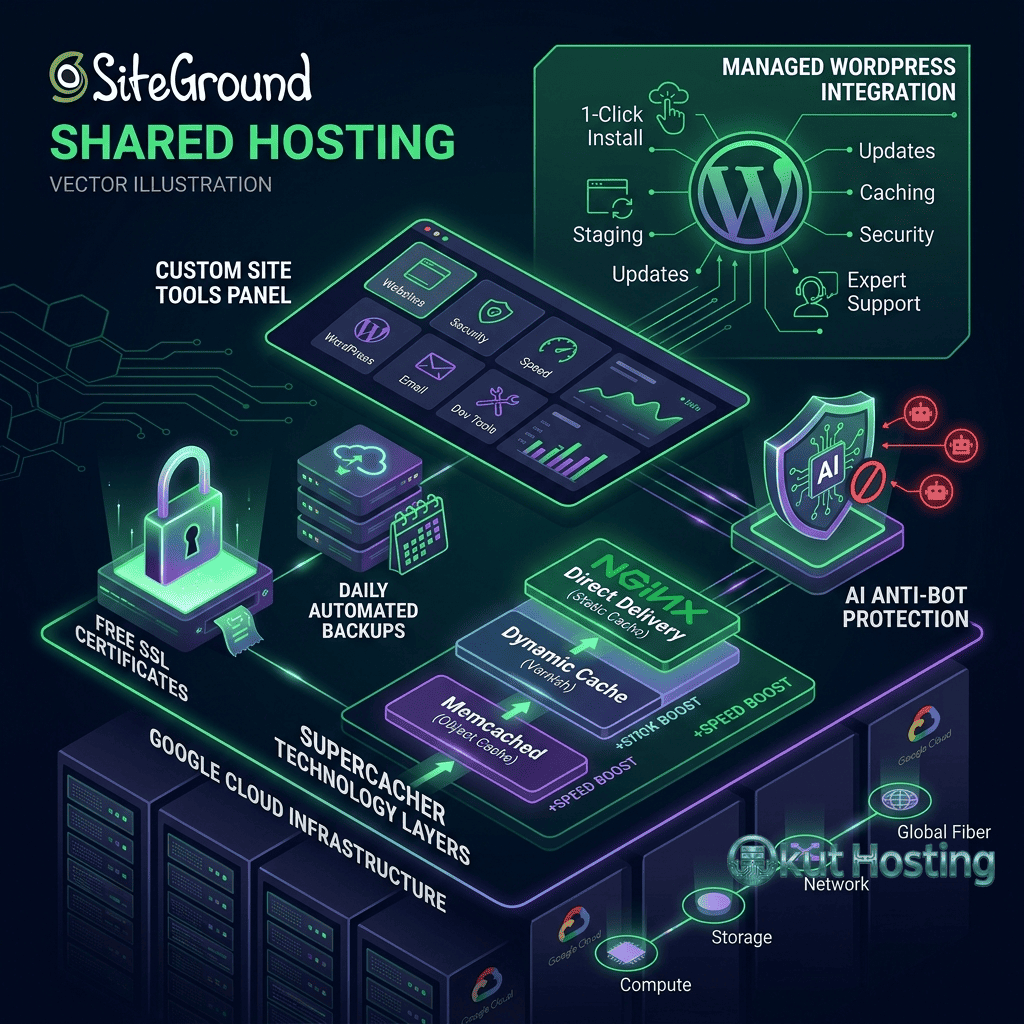
SiteGround’s 2020 migration to Google Cloud Platform (GCP) infrastructure represents one of the most significant technical upgrades in shared hosting history. GCP provides enterprise-grade data center infrastructure, global network connectivity, and redundancy capabilities that traditional hosting data centers cannot match. SiteGround’s implementation uses GCP’s infrastructure across multiple data center regions while maintaining the custom server configurations and caching systems that define SiteGround’s performance characteristics.
The GCP infrastructure provides geographic flexibility with data center options across the United States, Europe, Asia-Pacific, and Australia. This geographic distribution enables users to select data center locations close to their target audiences, reducing latency for visitors in the selected region. The global distribution also provides infrastructure redundancy — SiteGround’s systems can leverage GCP’s multi-zone and multi-region capabilities for enhanced reliability.
Google Cloud’s network infrastructure provides high-bandwidth, low-latency connectivity between data centers and to the public internet. The premium network tier that SiteGround uses routes traffic through Google’s private backbone rather than the public internet, reducing latency and improving connection reliability. This network quality advantage is particularly noticeable for visitors accessing sites from locations far from the origin data center, where public internet routing can introduce variable latency.

SuperCacher System
SiteGround’s proprietary SuperCacher implements three levels of caching that progressively accelerate content delivery for WordPress and other dynamic websites. The caching architecture operates at the server level rather than through application plugins, providing performance benefits that are transparent to the WordPress application and do not require WordPress plugin configuration.
Static cache (Level 1) stores static files — images, CSS, JavaScript, fonts — in server memory for rapid delivery. This caching layer accelerates the delivery of assets that don’t change between requests, reducing disk I/O and improving page load times for the static components of every page.
Dynamic cache (Level 2, available on GrowBig and GoGeek) stores fully rendered HTML pages in server memory, similar to full-page caching systems on managed hosting platforms. The dynamic cache serves complete pages without PHP or database processing, reducing response times to milliseconds for cached content. WordPress-aware cache invalidation automatically purges relevant cached pages when content changes, ensuring visitors always see current content.
Memcached (Level 3, available on GoGeek) provides object-level caching that stores database query results and PHP objects in memory. This caching layer reduces database load for WordPress operations that generate repetitive queries — site settings, menu structures, plugin configurations, and content metadata. Object caching provides the most benefit for logged-in users and dynamic pages that cannot be fully page-cached.
Site Tools Control Panel
SiteGround’s custom Site Tools control panel replaced cPanel in 2019, providing a modern management interface designed specifically for SiteGround’s hosting platform. Site Tools organizes hosting functions into intuitive categories — Site, Security, Speed, WordPress, Domain, Email, and Dev — with clean design and responsive layout that works well across desktop and mobile devices.
WordPress management through Site Tools includes one-click installation, automatic updates (configurable by update type), staging environment management, and WordPress security features. The staging tool enables creating test copies of production sites with a single click, testing changes in isolation, and deploying tested changes back to production. This staging capability is rare in the shared hosting tier and provides workflow functionality typically reserved for managed WordPress hosting.
The development tools section provides SSH access, Git integration for version-controlled deployments, WP-CLI access, multiple PHP version management, and cron job scheduling. These developer features make SiteGround’s shared hosting viable for professional development workflows, supporting the full range of tools that developers use for WordPress site management.
Site Tools also integrates Cloudflare CDN configuration, allowing users to enable and configure Cloudflare’s content delivery network through the hosting control panel. The integration simplifies CDN setup for users who might otherwise need to manage Cloudflare through a separate account and interface.
Collaboration and Client Management
SiteGround provides collaboration tools that support agencies and freelancers managing multiple client websites. The GoGeek plan includes white-label client access that enables creating client accounts with custom branding, providing clients with hosting management access under the agency’s brand rather than SiteGround’s. This feature enables agencies to offer branded hosting services to clients without operating their own hosting infrastructure.
Collaborator access controls enable sharing hosting management capabilities with team members or clients without sharing the primary account credentials. Different permission levels can be assigned to collaborators, controlling what hosting functions each collaborator can access. This access management supports professional workflows where multiple team members need varying levels of hosting management access without full account control.
WordPress Optimization
SiteGround is officially recommended by WordPress.org, reflecting the company’s investment in WordPress compatibility, performance, and support. WordPress installations on SiteGround benefit from the SuperCacher integration, PHP version optimization, and server configurations tuned for WordPress workloads. The SiteGround Optimizer plugin provides WordPress-specific configuration tools that integrate with the server-level caching and optimization systems.
The SiteGround Optimizer plugin manages frontend optimization including CSS and JavaScript minification, image compression, lazy loading, and browser caching configuration. These optimizations work alongside the server-level SuperCacher to create a comprehensive performance optimization stack that addresses both server-side and client-side performance factors.
WooCommerce is fully supported on SiteGround’s shared hosting with the dynamic cache providing WooCommerce-aware caching rules that correctly handle the distinction between cacheable product pages and dynamic transaction pages. The combination of server-level caching, SSD storage, and optimized PHP configurations provides WooCommerce performance that exceeds typical shared hosting levels.
Security Implementation
SiteGround implements comprehensive security across its shared hosting infrastructure. The custom WAF (Web Application Firewall) provides protection against common web attacks including SQL injection, cross-site scripting, and brute force attacks. SiteGround’s security team monitors emerging threats and updates WAF rules proactively, sometimes applying protection before security patches are officially released.
Free SSL certificates through Let’s Encrypt are included on all plans with automatic provisioning and renewal. Daily automated backups capture complete site snapshots with retention periods that vary by plan tier. On-demand backup creation is available on GrowBig and GoGeek plans for manual recovery point creation before significant changes. The backup infrastructure stores copies on separate systems from the production hosting environment.
Anti-bot AI protection identifies and blocks automated malicious traffic including credential stuffing attempts, vulnerability scanning, and spam bot activity. This AI-powered security operates at the server level, filtering threats before they reach the WordPress application and reducing the processing load that malicious traffic imposes on hosting resources.
Domain Management
SiteGround provides domain management services through Site Tools, including domain registration, transfer, DNS zone editing, subdomain creation, and domain parking. Domain registration pricing is competitive with dedicated domain registrars. Free domain registration is not included with hosting plans — domains are purchased separately, ensuring transparent pricing for hosting and domain services.
Migration Services
SiteGround provides a free WordPress migration plugin that automates the transfer process from other hosting providers. The SiteGround Migrator plugin handles file transfer, database migration, and URL search-and-replace operations with minimal user intervention. The plugin creates a complete copy of the WordPress site on SiteGround’s infrastructure, enabling testing on a temporary URL before DNS is updated to point to the new hosting environment.
Professional migration services are available for sites that the automated plugin cannot handle, including non-WordPress sites, complex multisite networks, and custom applications. The migration team coordinates the transfer, DNS configuration, and post-migration verification to ensure a seamless transition with minimal downtime.
Uptime and Reliability
SiteGround commits to a 99.9% uptime guarantee, backed by Google Cloud Platform’s enterprise infrastructure reliability. The GCP migration has improved SiteGround’s uptime performance by leveraging Google’s redundant infrastructure, network monitoring, and disaster recovery capabilities. Independent monitoring services consistently show SiteGround maintaining uptime above the guaranteed threshold.
Server monitoring operates continuously, with SiteGround’s operations team responding to infrastructure issues proactively. The combination of GCP’s infrastructure monitoring and SiteGround’s application-level monitoring provides multi-layer visibility into system health, enabling rapid response to issues before they impact customer sites.
Scalability Path
SiteGround offers a clear upgrade path from shared hosting to cloud hosting for sites that outgrow shared hosting capacity. SiteGround’s cloud hosting provides dedicated resources with scalable CPU, memory, and storage allocations. The cloud hosting tier uses the same Google Cloud Platform infrastructure and Site Tools management interface, providing a familiar management experience when upgrading. This continuity reduces the migration friction that occurs when upgrading requires switching to a different hosting provider with a different management interface and infrastructure.
PHP version management through Site Tools supports current stable PHP releases with the ability to switch between versions per domain. Running the latest PHP version provides measurable performance improvements for WordPress workloads. SiteGround maintains PHP versions with timely updates, ensuring that customers can access new PHP releases shortly after their stable release. The PHP configuration includes OPcache for bytecode caching and optimized PHP settings that are tuned specifically for WordPress performance on SiteGround’s Google Cloud infrastructure.
Email Hosting
Email hosting is included on all SiteGround shared plans, providing professional email addresses using hosted domain names. Email management through Site Tools includes account creation, forwarding configuration, autoresponder setup, and spam filtering. SiteGround’s email infrastructure supports IMAP, POP3, and SMTP with webmail access through the control panel.
Spam filtering operates at the server level, reducing unwanted email delivery before messages reach individual mailboxes. Email storage allocations are defined per plan tier, with higher tiers providing more per-mailbox storage capacity. For organizations requiring professional email communication under their domain name, SiteGround’s included email hosting eliminates the need for separate email service providers.
Customer Support
SiteGround’s customer support is consistently rated among the best in the shared hosting industry, with support satisfaction scores that exceed those of most competing providers. The support team provides 24/7 assistance through live chat, phone, and ticket-based support, with response times and resolution quality that have earned industry recognition.
Support representatives are trained on SiteGround’s specific infrastructure, including the SuperCacher system, Site Tools panel, Google Cloud Platform deployment, and WordPress optimization. This platform-specific training enables support staff to troubleshoot issues effectively and provide configuration recommendations tailored to SiteGround’s hosting environment rather than offering generic hosting advice.
Priority support on the GoGeek plan provides faster response times and access to senior support engineers for complex technical issues. This tiered support model ensures that premium-tier customers receive expedited assistance while maintaining quality support across all plan levels.
Money-Back Guarantee
SiteGround offers a 30-day money-back guarantee on hosting plans, providing full refunds for customers who cancel within the initial 30-day period. Domain registration fees and add-on service costs are handled separately from the hosting plan refund. The 30-day evaluation period provides sufficient time to test the hosting infrastructure, Site Tools interface, SuperCacher performance, and support quality before committing to the hosting service long-term.
SiteGround’s transparent approach to pricing and guarantees reflects the company’s confidence in its hosting product. The combination of quality infrastructure, genuine support expertise, and clear policies creates a hosting relationship built on service quality rather than contractual obligation — a distinction that SiteGround’s customer retention rates appear to validate over time.
Limitations
- Premium pricing: SiteGround is more expensive than budget shared hosting providers, which may not be justified for very simple sites with minimal traffic.
- Storage limits: Storage allocations are defined by plan tier rather than unlimited, requiring users to monitor storage consumption and potentially upgrade for storage-intensive sites.
- Custom panel transition: Users migrating from cPanel-based hosts need to adapt to Site Tools’ different interface and workflows.
- Renewal pricing: Standard industry renewal pricing increases apply, though SiteGround is transparent about renewal rates.
Summary
SiteGround delivers shared hosting that competes on quality rather than price, providing Google Cloud infrastructure, multi-level caching, staging environments, comprehensive security, and industry-leading support at premium shared hosting pricing. The platform’s technical investments — GCP migration, SuperCacher development, Site Tools creation, and AI-powered security — create a shared hosting product that delivers managed-hosting-level features and performance within the shared hosting pricing model. The Google Cloud Platform foundation provides infrastructure reliability and global reach that traditional data center operations cannot match.
Shared hosting providers including SiteGround, Bluehost, Hostinger, A2 Hosting, and DreamHost represent different value propositions within the shared hosting market. SiteGround’s premium positioning provides the most value for users who prioritize hosting quality, support responsiveness, and development workflow tools over absolute lowest pricing. For businesses, professional sites, and WordPress developers who need reliable hosting with genuine support expertise and modern development tools like staging environments and Git integration, SiteGround consistently delivers one of the strongest shared hosting experiences available in the market today.
Features, pricing, and availability discussed in this review reflect information available at the time of writing. Please verify current information directly on the official SiteGround website. Okut Hosting is an independent review platform with no affiliate relationships with any hosting company mentioned in this article.
For related reviews, see our Bluehost vs HostGator comparison, our GreenGeeks eco-hosting review, and our guide to shared hosting uptime comparison.