Pantheon stands apart from most WordPress hosting providers by approaching web hosting from a software development perspective rather than a traditional hosting perspective. Founded in 2010 by a team of developers who built infrastructure for high-profile websites, Pantheon was designed from the ground up for professional development teams who treat their WordPress sites as software projects — complete with version control, automated testing, code review workflows, and continuous deployment pipelines. The platform also hosts Drupal sites, reflecting its origins in the professional CMS development community.
What makes Pantheon distinctive is not just that it includes developer tools, but that developer workflows are the foundation upon which the entire platform is built. Every WordPress site on Pantheon operates within a Git-based version control system. Every change is tracked, reviewable, and reversible. Every deployment follows a defined path through development, testing, and production environments. This approach creates a hosting experience that feels more like a DevOps platform than a traditional web host, and understanding this distinction is essential for evaluating whether Pantheon aligns with specific organizational requirements and team capabilities.
Git-Based Infrastructure
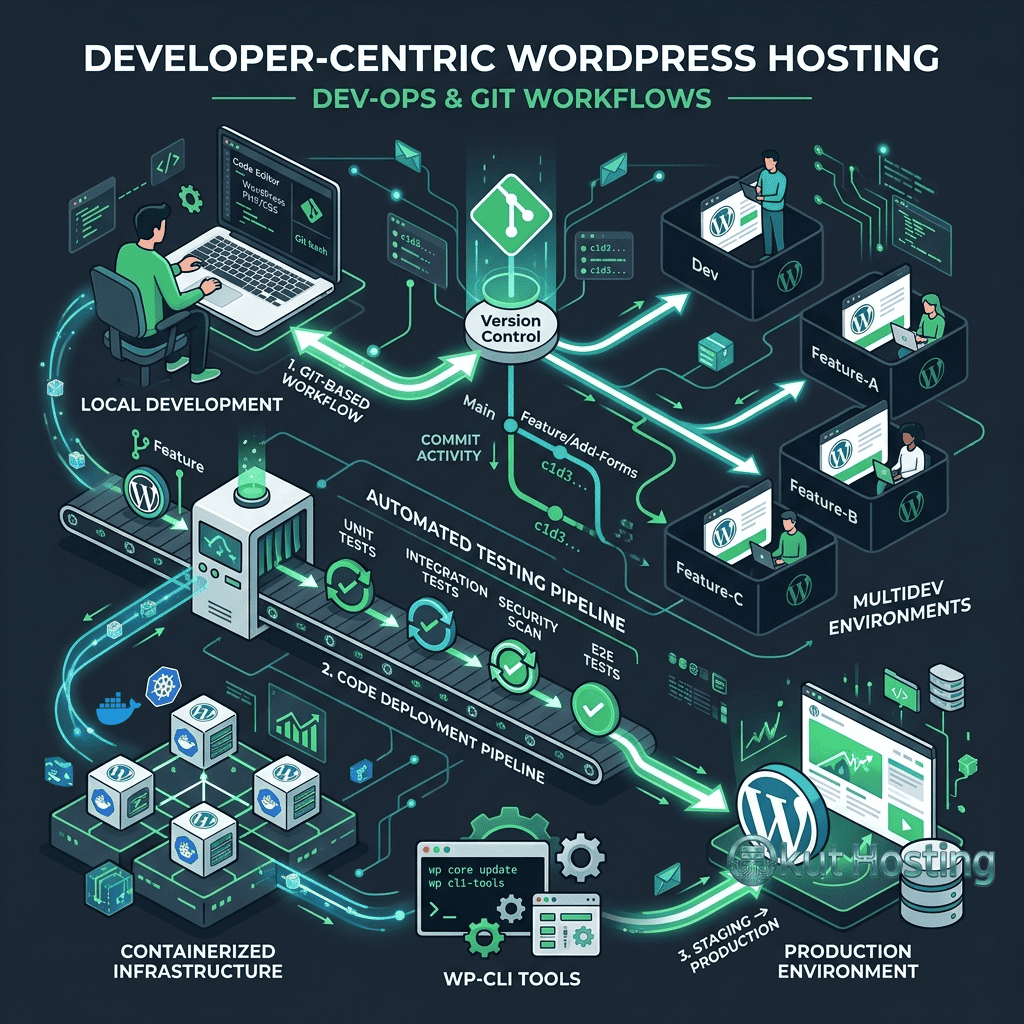
At the core of Pantheon’s architecture is the principle that WordPress code should be managed through Git version control. Every Pantheon site comes with a built-in Git repository that tracks all changes to WordPress themes, plugins, and configuration files. Developers interact with this repository through standard Git commands — clone, pull, push, branch, merge — using the same workflows they use for any other software project.
This Git-centric approach provides several fundamental advantages over traditional hosting file management. Every code change is recorded with a commit message, author attribution, and timestamp, creating a complete audit trail of site modifications. If a code change introduces a problem, the specific commit can be identified and reverted without affecting other changes. Multiple developers can work on different features simultaneously using Git branches, merging their changes when each feature is complete and tested.
The Git repository on Pantheon tracks the WordPress code layer — themes, plugins, and custom code — while separating the content layer (database and uploaded files) from version control. This separation follows the software development principle that code and data should be managed through different systems: code through version control with branching and merging, and content through database management with import and export. This architectural decision enables clean deployments where code changes can be promoted through environments without overwriting content changes made by editors in production.
For teams already using GitHub, GitLab, or Bitbucket for their code management, Pantheon’s Git integration means that existing repositories and workflows can extend to the hosting environment. External repositories can be connected to Pantheon through CI/CD integrations, enabling workflows where developers push code to their existing Git hosting service, trigger automated tests, and deploy successful builds to Pantheon automatically. This integration approach avoids lock-in to Pantheon’s built-in Git hosting while leveraging the platform’s deployment and environment management capabilities.
Multidev Environments
Pantheon’s Multidev feature extends the standard three-environment model (Development, Testing, Live) by allowing teams to create additional isolated environments for parallel workstreams. Each Multidev environment is a complete copy of the site’s code, database, and files, running on dedicated infrastructure with its own URL and access controls. Teams can create Multidev environments for individual features, bug fixes, experiments, or client reviews without affecting other development work.
Multidev environments integrate with Git branches — creating a Multidev environment automatically creates a corresponding Git branch, and vice versa. This integration means that the development workflow follows standard Git branching practices: create a branch for a new feature, develop and test in the corresponding Multidev environment, merge the branch when the feature is ready, and promote the changes through Testing to Live. For agencies and development teams accustomed to feature branch workflows, Multidev provides the hosting infrastructure that makes these workflows practical for WordPress projects.
The number of Multidev environments available depends on the plan tier, with higher tiers supporting more concurrent environments. For teams working on multiple features simultaneously or managing client review processes that require separate environments for different stakeholders, the Multidev capacity is a meaningful factor in plan selection. Each environment operates independently with its own URL, enabling concurrent testing and review without environment conflicts.
Deployment Workflow
Pantheon enforces a structured deployment workflow where code changes flow through defined stages before reaching the live site. The standard workflow moves code through three environments: Dev (development), Test (staging), and Live (production). Code is deployed from Dev to Test for quality assurance review, and from Test to Live for production release. Content (database and files) flows in the opposite direction, with production content pulled into lower environments to ensure testing occurs against current data.
This bidirectional workflow — code flows up while content flows down — solves a common problem in WordPress development where staging environments become stale because they do not reflect current production content. On Pantheon, developers can pull the latest production database and files into their development environment, apply code changes, and test against realistic data. This approach reduces the risk of code changes that work correctly in development but fail in production because of data differences.
Deployment operations are available through the Pantheon dashboard, the Terminus CLI (Command Line Interface), and through automation tools via the Pantheon API. The flexibility to deploy through multiple interfaces supports different team workflows — project managers can deploy through the visual dashboard, developers can deploy through the command line, and CI/CD pipelines can deploy programmatically through the API.
Automated Testing Integration
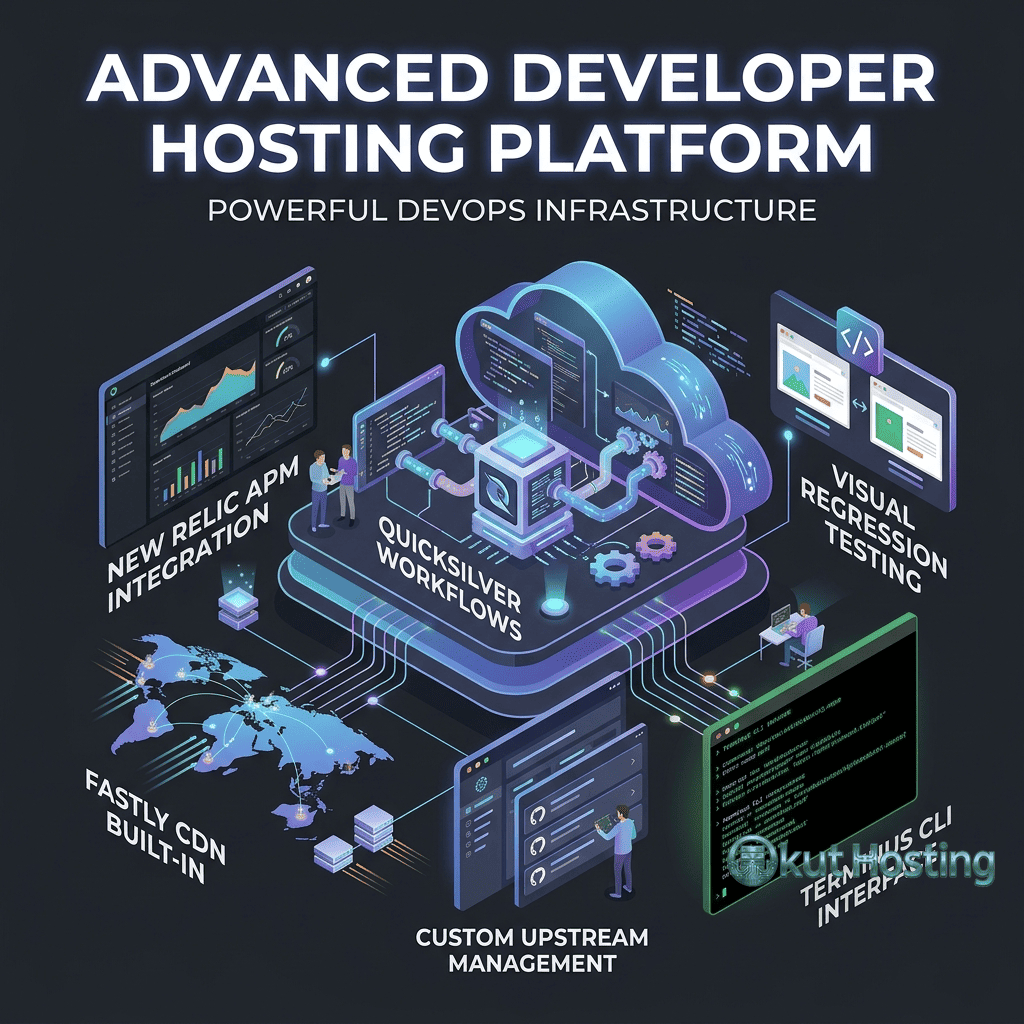
Pantheon integrates with automated testing frameworks that validate code changes before they reach production. Visual regression testing captures screenshots of key pages before and after code deployments, comparing them to detect unintended visual changes — broken layouts, missing elements, or styling issues — that might not be caught by functional testing alone.
The platform supports integration with continuous integration services like CircleCI, GitHub Actions, and other CI/CD platforms. These integrations enable automated test execution whenever code is pushed to a Pantheon Git repository, running unit tests, integration tests, linting checks, and other quality assurance processes before allowing deployment to proceed. For teams that have invested in automated testing, Pantheon’s CI/CD integration extends those testing practices to the deployment process.
Terminus, Pantheon’s CLI tool, provides command-line access to all platform management functions including site creation, environment management, deployment, backup operations, and team collaboration. Terminus commands can be scripted and integrated into automation workflows, enabling teams to build custom deployment pipelines, automated backup routines, and monitoring systems that interact with the Pantheon platform programmatically.
Global CDN and Performance
Pantheon’s Global CDN, powered by Fastly, provides edge caching and content delivery across a worldwide network of points of presence. The CDN is deeply integrated into the platform’s infrastructure rather than being a bolt-on service, with cache configuration managed through the Pantheon dashboard and platform-specific headers that control caching behavior at the edge.
The Advanced Global CDN option extends the base CDN capabilities with edge computing features, IP geolocation, custom edge configurations, and enhanced DDoS protection. Advanced Global CDN operates on the same Fastly infrastructure but provides additional configuration options and performance capabilities for sites with demanding traffic patterns or complex content delivery requirements.
Server-side performance on Pantheon benefits from containerized infrastructure, which provides dedicated resources for each site. PHP processing, database queries, and file operations occur within isolated containers with allocated CPU and memory resources. This isolation prevents the resource contention that degrades performance on shared hosting platforms, ensuring consistent performance regardless of traffic patterns on neighboring sites.
Security and Compliance
Pantheon implements security at multiple infrastructure layers. The platform provides automated HTTPS certificate provisioning and renewal through Let’s Encrypt, with custom SSL certificate support for organizations that require specific certificate authorities. DDoS protection operates at the CDN edge, mitigating large-scale attacks before they reach the origin infrastructure.
Automated backups capture daily snapshots of each environment’s code, database, and files. Backup retention varies by plan tier, and backups are accessible through the dashboard for one-click restoration or download. The Git-based code management provides an additional recovery mechanism — since all code changes are tracked in version control, any code state can be reconstructed from the Git history regardless of backup availability.
For enterprise and government customers, Pantheon offers hosting configurations that meet specific compliance requirements including SOC 2 Type II certification and support for HIPAA-compliant hosting through specialized configurations. These compliance capabilities make Pantheon suitable for organizations in regulated industries — healthcare, finance, education, and government — where hosting infrastructure must meet defined security and data protection standards.
Team Collaboration
Pantheon’s team management features support the collaborative workflows that professional development teams require. Role-based access controls define what each team member can do — developers can push code and manage environments, project managers can deploy to production, content editors can access the WordPress dashboard without infrastructure access. These roles align with the organizational structures that professional WordPress teams use, preventing accidental infrastructure changes by team members who should only manage content.
Agency and enterprise plans provide organizational features that support managing multiple sites across teams. Site portfolios can be organized by client, project, or team, with billing and access controls managed at the organization level. For agencies managing many client WordPress sites, this organizational structure reduces administrative overhead and provides clear visibility into site status across the portfolio.
WordPress Upstream Management
Pantheon uses the concept of “upstreams” to manage WordPress core updates and custom code distributions. An upstream is a Git repository that serves as the base for WordPress sites — Pantheon’s default upstream includes WordPress core, and organizations can create custom upstreams that include specific themes, plugins, and configurations. When the upstream is updated — for example, when a new WordPress core version is released — sites connected to that upstream receive one-click update notifications through the dashboard.
Custom upstreams enable agencies and enterprise organizations to maintain standardized WordPress configurations across multiple sites. A custom upstream might include a corporate theme, required plugins, security configurations, and performance optimizations. When the upstream is updated, all connected sites can apply the updates through a consistent process, reducing the manual effort of maintaining consistent configurations across site portfolios. This capability is particularly valuable for large organizations managing dozens or hundreds of WordPress sites that share common configurations.
Support and Documentation
Pantheon provides support through ticketing and chat channels, with support tier levels varying by plan. Higher-tier plans include priority support with faster response times and access to senior platform engineers. The support team specializes in platform-specific issues including deployment workflows, environment management, Git operations, and performance troubleshooting. For WordPress-specific issues beyond platform operation, Pantheon’s documentation and community resources provide guidance on working within the platform’s architectural constraints.
Documentation is extensive and developer-oriented, covering platform architecture, workflow best practices, API reference, Terminus CLI documentation, and integration guides for CI/CD platforms. The documentation reflects Pantheon’s developer audience with code examples, command-line instructions, and architectural diagrams that technical teams expect. Community resources include forums, webinars, and blog posts that address common platform questions and advanced use cases.
Migration Path
Migrating WordPress sites to Pantheon involves importing the site’s code, database, and files into Pantheon’s Git-based architecture. Pantheon provides guided migration tools through the dashboard and supports manual migration through Git and WP-CLI for sites with complex configurations. The migration process separates the code layer into the Git repository and the content layer into the platform’s content management system, establishing the architectural separation that defines ongoing site management on Pantheon.
For sites migrating from traditional hosting environments where code and content are not separated, the migration process may require restructuring how themes and plugins are organized to fit Pantheon’s architecture. This restructuring is a one-time effort that establishes the clean separation between code and content that enables Pantheon’s deployment workflows going forward.
Pricing and Plan Structure
Pantheon structures pricing around site tiers and organizational plans. Site plans range from free sandbox environments for development and testing to Performance plans designed for production sites with varying traffic capacities. Higher tiers provide more resources, additional Multidev environments, enhanced support, and access to advanced features like Advanced Global CDN and premium support channels.
The free sandbox tier enables developers to experiment with the platform, build proof-of-concept sites, and develop client sites before committing to a paid plan. This free tier lowers the barrier to evaluation, allowing teams to assess the platform’s workflow and tools before making a financial commitment. Paid plans apply when sites need custom domains, production traffic handling, and enterprise features.
Pricing and features are subject to change. Please verify current plan details and pricing on the official Pantheon website before making hosting decisions.
Limitations
- Developer-oriented complexity: Pantheon’s Git-based workflows and development-focused tools can be overwhelming for non-technical users. Site owners without development experience may find the platform unnecessarily complex compared to more user-friendly managed WordPress hosts.
- No email hosting: Email services are not included and must be provisioned through external providers.
- Plugin restrictions: Pantheon restricts plugins that conflict with its managed infrastructure, including most caching plugins, certain backup plugins, and plugins that modify server-level configurations. The restricted plugin list is more extensive than most managed WordPress hosts.
- File system restrictions: Pantheon’s containerized architecture imposes specific file system behaviors, including a read-only code layer in Test and Live environments. Plugins or themes that write to the code directory (rather than the wp-content/uploads directory) may encounter issues.
- Higher pricing: Pantheon’s pricing reflects its professional-grade tooling and infrastructure, positioning it above budget and mid-tier managed WordPress hosts. The value proposition is strongest for teams that actively use the development workflow tools.
Summary
Pantheon represents a fundamentally different approach to WordPress hosting — one built around professional software development practices rather than traditional hosting conventions. The Git-based infrastructure, Multidev environments, structured deployment workflows, and CI/CD integration create a platform that professional development teams find naturally aligned with their existing practices. For teams that treat WordPress as a software development platform, Pantheon provides tools and workflows that no traditional hosting provider matches.
Managed WordPress hosting platforms including Pantheon, WP Engine, Kinsta, and Cloudways each serve different segments of the WordPress hosting market. Pantheon’s differentiation is its developer-centric workflow tooling, which creates maximum value for professional development teams and minimal value for individual site owners who manage their WordPress sites through the admin dashboard. Evaluating Pantheon requires assessing whether the development workflow tools align with team practices and whether the value of those tools justifies the pricing relative to alternatives that may offer comparable raw hosting performance at lower price points.
Features, pricing, and availability discussed in this review reflect information available at the time of writing. Hosting services evolve continuously, and details may have changed since publication. Please verify current information directly on the official Pantheon website. Okut Hosting is an independent review platform with no affiliate relationships with any hosting company mentioned in this article.
For related reviews, see our Cloudways cloud hosting review, our WP Engine enterprise platform guide, and our WordPress staging environments guide.