SiteGround occupies a distinctive position in the WordPress hosting landscape. While many hosting providers offer WordPress as one option among many, SiteGround has built much of its reputation specifically around WordPress hosting quality, investing in custom server technology and WordPress-specific tooling that sets it apart from typical shared hosting providers. The company serves over two million domains worldwide and has maintained a strong presence in both the shared hosting and managed WordPress segments of the market.
What makes SiteGround worth examining in detail is its approach to bridging the gap between affordable shared hosting and premium managed WordPress platforms. Rather than simply installing WordPress on a standard shared server and calling it WordPress hosting, SiteGround has developed proprietary systems — including its SuperCacher technology and custom server monitoring tools — that bring managed hosting capabilities to lower price points. This review examines SiteGround’s WordPress hosting from an infrastructure perspective, analyzing the features, performance tools, and support systems that define the platform.
Server Infrastructure and Technology
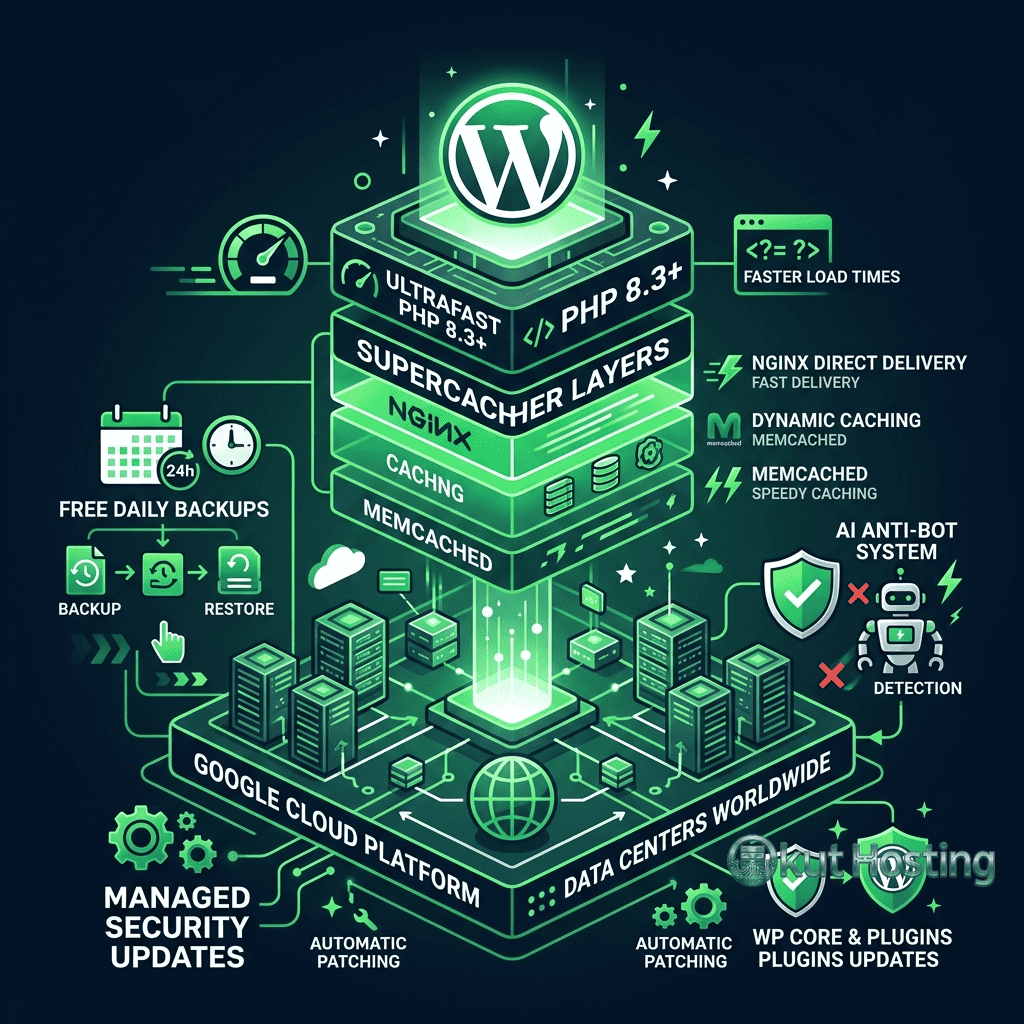
SiteGround runs its infrastructure on Google Cloud Platform, a decision the company made in 2020 when it migrated away from its previous data center infrastructure. This migration placed SiteGround on the same underlying cloud platform used by several premium managed WordPress hosts, including Kinsta, while maintaining price points closer to traditional shared hosting. Google Cloud provides SiteGround with access to high-performance computing resources, global network connectivity, and data centers across multiple continents.
The server stack that SiteGround deploys for WordPress hosting includes Nginx as the primary web server, with custom configurations optimized for WordPress workloads. Nginx handles static content delivery and SSL termination efficiently, passing dynamic requests to PHP-FPM for processing. SiteGround keeps its PHP versions current, typically supporting the latest stable PHP releases within weeks of their official launch and providing tools for switching between PHP versions directly from the hosting dashboard.
SiteGround uses SSD storage across all hosting plans, which provides significantly faster read and write speeds compared to traditional hard disk drives. For WordPress sites, fast disk I/O translates to quicker database queries, faster file serving, and reduced page generation times. The persistent SSD storage is provisioned through Google Cloud’s infrastructure, benefiting from the redundancy and reliability built into Google’s storage systems.
Data center locations span multiple regions including the United States, Europe, Asia-Pacific, and Australia. During account setup, users select their preferred data center location, and SiteGround recommends choosing the location closest to the target audience to minimize network latency. This geographic selection affects the server location for all sites on the account, though SiteGround’s CDN capabilities help offset distance-related latency for global audiences.
SuperCacher Technology
SiteGround’s proprietary SuperCacher system represents one of its most significant technical differentiators. SuperCacher operates across three distinct caching layers, each addressing a different aspect of WordPress performance optimization.
The first layer is static cache, which stores and serves static assets — images, CSS files, JavaScript files, and fonts — directly from Nginx without invoking PHP processing. This layer operates similarly to standard web server caching and provides the foundation for faster content delivery.
The second layer is dynamic cache, which functions as a full-page cache stored in server memory. When a visitor requests a WordPress page, the dynamic cache layer checks whether a cached version of the fully-rendered HTML exists in memory. If it does, Nginx serves the cached version directly, bypassing PHP and MySQL entirely. This dramatically reduces server response times for cached pages, often delivering time-to-first-byte measurements in the sub-200 millisecond range. The dynamic cache includes intelligent rules for cache invalidation — when content is updated through the WordPress dashboard, the relevant cached pages are automatically purged and regenerated on the next request.
The third layer is Memcached-based object caching, which stores frequently accessed database query results in memory. WordPress generates numerous database queries for each page load, and many of these queries retrieve the same data repeatedly — site settings, widget configurations, menu structures, and other persistent data. Object caching reduces database load by serving these repeated queries from memory rather than executing them against the MySQL database each time.
SiteGround provides a WordPress plugin called SG Optimizer that integrates with SuperCacher and adds additional optimization features including image optimization, minification of CSS and JavaScript files, lazy loading for images, and WebP image conversion. The plugin is designed specifically for SiteGround’s server environment and avoids the compatibility issues that can arise when using third-party caching plugins that were not designed for the specific server configuration.
Security Features
Security is an area where SiteGround has invested substantially, implementing multiple layers of protection that operate at the server level rather than relying solely on WordPress plugins for security. This server-level approach means that security measures are active before requests even reach the WordPress installation.
SiteGround’s custom Web Application Firewall operates at the server level, filtering incoming requests against a continuously updated set of rules designed to block common attack patterns. The WAF rules are developed by SiteGround’s security team, who monitor the WordPress ecosystem for newly discovered vulnerabilities and create blocking rules, often within hours of vulnerability disclosure. This proactive approach means that SiteGround’s WAF can protect against zero-day WordPress vulnerabilities before patches are available.
The AI Anti-Bot System analyzes traffic patterns to identify and block automated bot traffic that accounts for a significant portion of malicious activity targeting WordPress sites. The system uses machine learning models trained on traffic data across SiteGround’s network to distinguish between legitimate visitors, beneficial bots like search engine crawlers, and malicious automated traffic. By blocking malicious bots at the server level, the system reduces server resource consumption and prevents brute force login attempts, comment spam, and vulnerability scanning.
Automated SSL certificate provisioning through Let’s Encrypt is included on all plans, with wildcard SSL certificates available on higher-tier plans. SiteGround handles certificate renewal automatically, preventing the expired certificate warnings that can damage visitor trust and search engine rankings. For sites requiring enhanced validation certificates, SiteGround supports premium SSL certificate installation.
Daily backup systems run automatically on all plans, with backup retention periods varying by plan tier. The GoGeek plan includes on-demand backup creation and priority backup restoration, while lower-tier plans provide standard daily backups with restore capabilities through the SiteGround dashboard. Backup systems capture the complete site environment including databases, files, and email accounts.

WordPress Management Tools
SiteGround provides its hosting management through a custom-built dashboard called Site Tools, which replaced the traditional cPanel interface. Site Tools is designed specifically for SiteGround’s infrastructure and provides a more streamlined interface for managing WordPress sites compared to generic control panels.
The WordPress management section within Site Tools includes automated WordPress installation, automatic WordPress core updates, staging environment creation (on GoGeek plans), and WordPress multisite support. The staging feature allows developers to create a copy of their production site, make changes in isolation, and deploy those changes to production when ready — a workflow that was previously available only on premium managed hosting platforms.
SiteGround’s WordPress auto-update system handles minor WordPress core updates automatically on all plans, keeping sites protected against known security vulnerabilities without requiring manual intervention. Major version updates can be configured for automatic deployment or held for manual review, depending on the site owner’s preference. This flexibility allows cautious site owners to test major updates in staging before applying them to production.
The Site Tools dashboard also includes a file manager, database management through phpMyAdmin, email account management, DNS configuration, and SSL certificate management. For developers, SSH access is available on all plans, and Git integration enables version-controlled deployments for teams that manage their WordPress themes and plugins through code repositories.
Hosting Plans and Resource Allocation
SiteGround structures its WordPress hosting across three plan tiers: StartUp, GrowBig, and GoGeek. Each tier differs in resource allocation, feature availability, and the number of websites supported. Understanding these tiers helps identify which plan aligns with specific hosting needs.
The StartUp plan supports a single website with a defined amount of web space and a monthly visit allocation. This plan includes the core hosting features — SSD storage, free SSL, daily backups, email accounts, and unmetered traffic — but does not include staging environments, on-demand backups, or priority support. StartUp suits new websites, personal blogs, and small projects with moderate traffic expectations.
The GrowBig plan supports multiple websites and increases the resource allocations for web space and monthly visits. GrowBig adds SuperCacher’s dynamic and Memcached caching layers, which are not available on the StartUp plan, providing a meaningful performance improvement for WordPress sites. This tier represents a significant upgrade in both resources and features, making it suitable for growing websites and small business sites with increasing traffic.
The GoGeek plan further increases resources and adds premium features including staging environments, priority support, white-label client management, and the highest resource allocation. GoGeek is designed for developers, agencies, and high-traffic websites that need advanced tooling and priority access to support resources. Resource isolation on GoGeek provides more consistent performance under traffic fluctuations compared to lower-tier plans.
All plans include unmetered traffic, meaning SiteGround does not charge bandwidth overage fees. However, the monthly visit allocations serve as soft limits — sites consistently exceeding their plan’s visit allocation may be asked to upgrade to a higher tier. SiteGround’s pricing follows the industry-standard promotional model where initial terms are offered at lower introductory rates, with regular pricing applying upon renewal.
Pricing and features are subject to change. Please verify current plan details and pricing on the official SiteGround website before making hosting decisions.
Content Delivery Network
SiteGround includes Cloudflare CDN integration on all hosting plans, enabling sites to distribute cached content across Cloudflare’s global network of data centers. CDN integration reduces latency for visitors located far from the origin server by serving cached static assets from the nearest Cloudflare edge location. For WordPress sites with international audiences, CDN integration can significantly improve page load times for visitors in regions distant from the selected data center location.
The CDN integration is managed through the Site Tools dashboard, where users can enable Cloudflare with a few clicks. SiteGround provides both free and premium Cloudflare tiers, with premium tiers offering additional features like image optimization, mobile optimization, and enhanced security rules. The integration handles DNS configuration automatically, simplifying what would otherwise require manual Cloudflare account setup and DNS migration.
Email Hosting
Unlike some hosting providers that have discontinued email services, SiteGround includes email hosting on all plans. Users can create professional email addresses using their domain name, with email management handled through the Site Tools dashboard. Email accounts support IMAP and POP3 protocols, include webmail access, and provide spam filtering through a combination of SpamAssassin and SiteGround’s custom email security rules.
Email hosting is increasingly rare among premium WordPress hosting providers — several managed WordPress platforms do not include email services at all, requiring users to set up separate email hosting through services like Google Workspace or Microsoft 365. SiteGround’s inclusion of email hosting adds practical value for small businesses and individuals who prefer managing their website and email through a single provider.
Customer Support Structure
SiteGround provides 24/7 customer support through live chat, phone, and a ticketing system. The support team is trained on WordPress-specific issues and can assist with hosting configuration, WordPress troubleshooting, performance optimization, and migration assistance. SiteGround consistently receives positive feedback for support quality in independent hosting reviews and user surveys, though individual experiences vary based on issue complexity and timing.
Priority support, available on the GoGeek plan, provides expedited access to senior support representatives with shorter wait times. Standard support on StartUp and GrowBig plans follows a first-come-first-served queue model. SiteGround also maintains an extensive knowledge base with tutorials, guides, and troubleshooting articles covering common WordPress hosting scenarios.
Site migration assistance is available for users moving existing WordPress sites to SiteGround. The SiteGround Migrator plugin automates the transfer process, handling file and database migration with minimal technical involvement. For sites with complex configurations, SiteGround’s support team can provide guidance through the migration process. The first site migration is typically included free of charge on new hosting accounts.
Performance Considerations
SiteGround’s performance profile varies meaningfully across plan tiers due to the progressive unlocking of caching features. StartUp plan users have access only to static caching, while GrowBig and GoGeek users benefit from the full SuperCacher stack including dynamic page caching and Memcached object caching. This means that WordPress performance on SiteGround’s entry-level plan may not reflect the performance capabilities available on higher tiers.
Server response times on SiteGround’s Google Cloud infrastructure generally fall within competitive ranges for the shared hosting segment. With all caching layers active, SiteGround achieves time-to-first-byte measurements that approach managed hosting performance levels, particularly for cached content. Uncached dynamic content performance depends on the PHP processing capacity available to the account, which increases with higher plan tiers.
Limitations and Considerations
- Shared resources: Despite Google Cloud infrastructure, SiteGround’s plans operate in a shared hosting model where server resources are distributed among multiple accounts. During traffic spikes across shared infrastructure, individual site performance may fluctuate.
- Renewal pricing: Introductory pricing is significantly lower than renewal rates. Budget planning should account for regular renewal pricing rather than promotional rates.
- Plan-gated features: Key performance features like dynamic caching and staging environments require GrowBig or GoGeek plans. The StartUp plan provides a more limited feature set than the platform’s full capabilities suggest.
- Storage limits: Web space allocations are defined per plan and may be limiting for sites with large media libraries or extensive plugin installations.
- Server location lock: Data center selection is made during account setup and cannot be easily changed afterward. Selecting the wrong initial location can affect performance for the target audience.
Comparing SiteGround in Context
Within the WordPress hosting market, SiteGround occupies a middle ground between budget shared hosting providers and premium managed WordPress platforms. Shared hosting providers like Hostinger and Bluehost compete at lower price points with larger resource allocations but fewer WordPress-specific optimizations. Managed platforms like Kinsta, WP Engine, and Cloudways provide more isolated resources and advanced developer tools but at significantly higher monthly costs.
SiteGround’s value proposition centers on delivering managed WordPress features — server-level caching, custom security tools, staging environments, and WordPress-specialized support — at shared hosting price points. For site owners who need more than basic shared hosting but whose requirements do not justify the cost of fully managed WordPress hosting, SiteGround’s feature set addresses that middle segment effectively.
Summary
SiteGround has built a WordPress hosting platform that extends well beyond standard shared hosting through its investment in proprietary caching technology, security systems, and WordPress-specific management tools. The platform’s migration to Google Cloud infrastructure positioned it alongside technically capable competitors while maintaining accessibility through its tiered pricing model.
The choice of SiteGround depends on where specific needs fall within the hosting spectrum. Sites requiring budget-friendly hosting with genuine WordPress optimization may find SiteGround’s GrowBig and GoGeek tiers deliver meaningful value. Hosting platforms like SiteGround, Cloudways, A2 Hosting, and DreamHost each offer different approaches to WordPress optimization, and the appropriate choice depends on traffic requirements, technical needs, and budget parameters. Evaluating current pricing, included features, and plan limitations directly on the provider’s website ensures decisions reflect the most current offerings.
Features, pricing, and availability discussed in this review reflect information available at the time of writing. Hosting services evolve continuously, and details may have changed since publication. Please verify current information directly on the official SiteGround website. Okut Hosting is an independent review platform with no affiliate relationships with any hosting company mentioned in this article.
For related comparisons, see our review of Kinsta vs WP Engine managed hosting, our overview of Cloudways cloud-based hosting, and our guide to managed vs shared WordPress hosting differences.