WordPress hosting performance is determined by a complex interaction of server infrastructure, software configuration, content optimization, and network delivery factors. Understanding these factors and how they interact enables informed decisions about hosting selection, server configuration, and optimization strategies that collectively determine how fast a WordPress site loads for visitors. Page speed affects every aspect of a website’s success — search engine rankings, visitor engagement, conversion rates, and user satisfaction — making performance optimization one of the most impactful investments a site owner can make.
This guide examines the complete performance stack for WordPress hosting, from the server hardware that processes requests to the network infrastructure that delivers content to visitors. Each layer of the stack contributes to overall performance, and optimizing any single layer provides diminishing returns when other layers remain bottlenecks. Effective WordPress performance optimization requires understanding the full stack and addressing the specific bottlenecks that limit performance for each individual site.
Server Hardware Factors
The physical server hardware underlying a WordPress hosting environment establishes the performance ceiling that no software optimization can exceed. CPU processing speed determines how quickly PHP code is executed, database queries are processed, and server-side operations complete. WordPress is predominantly single-threaded for individual page requests, meaning that single-core clock speed has a more direct impact on per-request performance than total core count.
Memory (RAM) availability affects how much data can be cached in memory, how many concurrent PHP processes can run simultaneously, and how large database query result sets can be before they require disk-based temporary tables. Insufficient memory causes PHP processes to be queued rather than processed concurrently, increases the frequency of disk-based database operations, and limits the effectiveness of object caching systems that store data in memory.
Storage technology has evolved from spinning hard disk drives (HDD) through solid-state drives (SSD) to NVMe (Non-Volatile Memory Express) drives, with each generation providing order-of-magnitude improvements in read and write speeds. WordPress workloads generate significant disk I/O through database reads and writes, file system operations, and media file serving. NVMe storage provides the fastest disk I/O available, with random read speeds that are particularly beneficial for the random access patterns that database queries generate.
Network bandwidth and latency between the server and the visitor determine how quickly content travels from the server to the browser. Server network connectivity through high-bandwidth connections (1 Gbps, 10 Gbps, or higher) ensures that the server’s network connection does not become a bottleneck under traffic load. Geographic distance between the server and the visitor introduces unavoidable network latency that CDN delivery can mitigate but not eliminate for dynamic content.
PHP Configuration and Optimization
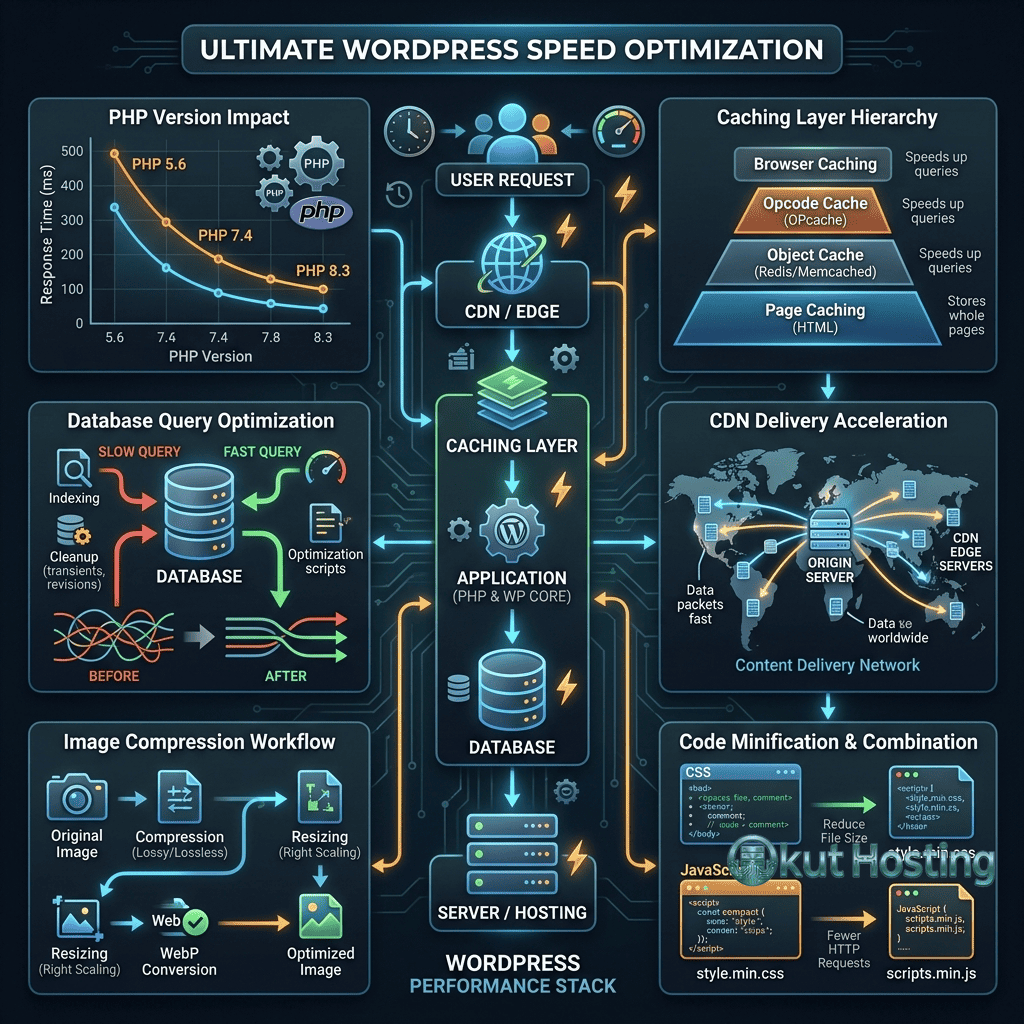
PHP version has a substantial impact on WordPress performance. Each major PHP release has included significant speed improvements for WordPress-specific workloads. PHP 8.x provides measurably faster WordPress execution compared to PHP 7.x, which itself was dramatically faster than PHP 5.x. Running the latest stable PHP version is one of the simplest and most impactful performance optimizations available — yet many WordPress sites continue to run on older PHP versions, leaving significant performance gains unrealized.
OPcache stores compiled PHP bytecode in shared memory, eliminating the compilation step for subsequent executions of the same PHP files. WordPress executes the same PHP files thousands of times per day, and without OPcache, each execution requires re-compiling PHP source code into bytecode — a CPU-intensive process that adds measurable overhead to every page request. OPcache should be enabled on all WordPress hosting environments, with memory allocation sufficient to store the compiled bytecode for all active PHP files.
PHP worker configuration determines how many concurrent PHP requests the server can process simultaneously. Each WordPress page request that is not served from cache requires a PHP worker to process it. When all available PHP workers are occupied, additional requests queue until a worker becomes available, creating the waiting time that visitors experience as slow page loads. The optimal PHP worker count depends on the server’s CPU and memory resources, the average execution time of WordPress requests, and the expected concurrent request volume.
PHP memory limits set the maximum memory allocation for individual PHP processes. WordPress core requires relatively modest memory, but plugins, themes, and WooCommerce can significantly increase per-request memory consumption. Setting the PHP memory limit too low causes memory exhaustion errors, while setting it too high reduces the number of concurrent PHP workers the server can support. Typical WordPress sites operate well with 256MB PHP memory limits, while WooCommerce stores and plugin-heavy installations may require 512MB or more.
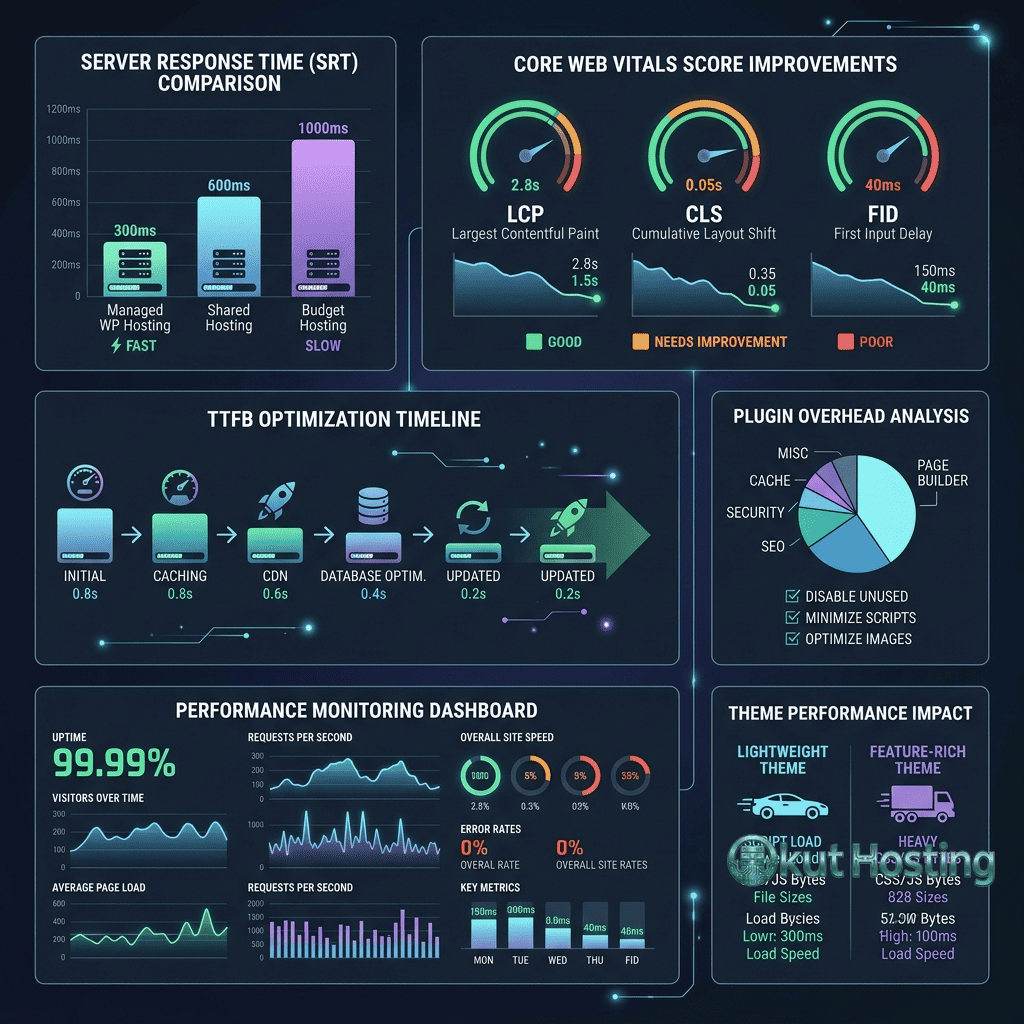
Caching Strategies
Caching is the most impactful performance optimization for WordPress because it eliminates the resource-intensive process of generating pages dynamically for every request. WordPress generates each page by executing PHP code, querying the MySQL database, assembling content from multiple sources, and rendering HTML — a process that can take hundreds of milliseconds even on optimized servers. Caching stores the results of this process so that subsequent requests for the same content can be served without repeating the generation process.
Page caching stores fully rendered HTML pages, serving cached HTML directly to visitors without invoking PHP or the database. This is the most impactful caching layer because it completely bypasses the most resource-intensive components of the WordPress request processing pipeline. Page caching can be implemented at the server level (Varnish, Nginx FastCGI cache, LiteSpeed Cache) or at the application level through WordPress plugins (WP Super Cache, W3 Total Cache, WP Rocket).
Object caching stores the results of individual database queries and PHP function calls in memory (Redis or Memcached). WordPress generates dozens to hundreds of database queries per page load — site settings, menu structures, plugin options, widget configurations, and content queries. Object caching stores the results of these queries in memory, serving subsequent identical queries from the cache rather than re-executing them against the database. Object caching provides the greatest benefit for logged-in users and dynamic content that cannot be page-cached.
Browser caching instructs visitors’ browsers to store static assets locally, eliminating redundant downloads of CSS, JavaScript, images, and fonts on subsequent page views. Proper cache header configuration — using Cache-Control and ETag headers with appropriate expiration times — reduces server load and improves perceived performance for returning visitors.
Database Optimization
The MySQL database is often the primary performance bottleneck for WordPress sites, particularly for sites with large content volumes, complex plugins, or WooCommerce stores. Database optimization involves both server-level MySQL configuration and WordPress-specific data management.
MySQL server configuration determines memory allocation for query caching, sort buffers, join buffers, and temporary tables. WordPress-optimized MySQL configurations allocate memory appropriately for the query patterns WordPress generates — frequent small queries for options and metadata, occasional large queries for content listings, and complex join queries for advanced search and filtering operations.
Database table optimization addresses fragmentation and overhead that accumulate in WordPress databases over time. MySQL tables can become fragmented as rows are inserted, updated, and deleted, leading to wasted storage space and slower query performance. Running OPTIMIZE TABLE operations on WordPress database tables periodically reclaims fragmented space and rebuilds table indexes for optimal query performance.
Post revision management prevents the WordPress database from growing unnecessarily. WordPress stores a revision for every content save operation by default, creating hundreds or thousands of revision rows for frequently edited content. Limiting the number of revisions WordPress retains (through the WP_POST_REVISIONS constant in wp-config.php) controls database growth without sacrificing content recovery capabilities. Cleaning up existing excess revisions reduces database size and improves query performance for content-related operations.
Transient data cleanup addresses another source of database bloat. WordPress’s transient API stores temporary data with expiration times, but expired transients are not automatically removed from the database until they are accessed again. Over time, thousands of expired transients can accumulate, increasing database size and slowing option-related queries. Regular transient cleanup through maintenance plugins or WP-CLI commands prevents this accumulation.
Content Delivery Networks
CDN (Content Delivery Network) integration distributes cached content across a global network of edge servers, serving static assets from the nearest edge location to each visitor. This geographic distribution reduces the network latency component of page load times, which is particularly impactful for sites serving audiences across multiple geographic regions.
Static asset CDN delivery caches CSS, JavaScript, images, fonts, and other static files at edge locations worldwide. These files do not change between requests and can be cached indefinitely (with cache busting through filename versioning when updates occur). Static CDN delivery reduces origin server bandwidth consumption, improves page load times for geographically distant visitors, and provides DDoS resilience by distributing traffic across multiple edge locations.
Full-page CDN caching extends edge delivery to complete HTML pages, serving entire WordPress pages from the edge without any request reaching the origin server. Platforms like Rocket.net and Cloudflare APO (Automatic Platform Optimization) implement full-page edge caching with WordPress-aware cache invalidation, providing the fastest possible page delivery for cached content. The cache hit rate — the percentage of requests served from the edge cache — determines the performance benefit of full-page CDN caching.
Core Web Vitals Optimization
Google’s Core Web Vitals metrics — Largest Contentful Paint (LCP), First Input Delay (FID), and Cumulative Layout Shift (CLS) — have become important performance targets because they influence search engine rankings. Optimizing for these metrics requires addressing specific performance factors that each metric measures.
Largest Contentful Paint measures the time from page load start to the largest visible content element rendering. LCP optimization involves reducing server response times (TTFB), prioritizing the loading of above-the-fold content, optimizing the largest image or text block on the page, and eliminating render-blocking resources that delay initial content rendering.
First Input Delay measures the delay between a user’s first interaction (click, tap, key press) and the browser’s ability to process that interaction. FID optimization involves reducing JavaScript execution time, breaking long tasks into smaller chunks, minimizing third-party JavaScript impact, and using web workers for heavy processing that does not require DOM access.
Cumulative Layout Shift measures the visual stability of the page during loading — how much visible content shifts position as the page loads. CLS optimization involves specifying image and video dimensions, reserving space for dynamically loaded content, avoiding inserting content above existing visible content, and ensuring that web fonts do not cause text reflow when they load.
Image Optimization
Images typically represent the largest portion of WordPress page weight, making image optimization one of the highest-impact performance improvements. Effective image optimization involves compression, format selection, responsive serving, and lazy loading.
Image compression reduces file sizes by removing unnecessary metadata and applying lossy or lossless compression algorithms. Lossy compression (like JPEG quality reduction) produces smaller files with some quality loss, while lossless compression preserves full quality at larger file sizes. Modern formats like WebP and AVIF provide superior compression ratios compared to JPEG and PNG, delivering smaller file sizes at equivalent visual quality.
Responsive image serving uses the HTML srcset attribute to provide multiple image sizes, allowing browsers to download the appropriate size for the visitor’s device and viewport. Serving a 2000-pixel image to a mobile device with a 400-pixel viewport wastes bandwidth and slows page loads. WordPress generates multiple image sizes during upload, and properly configured themes serve responsive images that match the display context.
Lazy loading defers the loading of images below the visible viewport until the visitor scrolls toward them. This optimization reduces the initial page weight and number of HTTP requests, improving Time to Interactive and initial rendering speed. WordPress includes native lazy loading support for images, and plugins can extend lazy loading to iframes, videos, and other embedded content.
Third-Party Script Management
Third-party scripts — analytics trackers, advertising code, social media widgets, live chat tools, and marketing pixels — often represent the largest uncontrolled performance impact on WordPress sites. Each third-party script adds DNS lookups, HTTP connections, JavaScript download time, and execution time that directly affect page load metrics. Unlike WordPress code and hosting infrastructure that site owners control, third-party scripts execute external code over which site owners have limited optimization ability.
Managing third-party script impact involves auditing which scripts are loaded, whether each script is necessary, and how each script is loaded. Deferring non-critical third-party scripts (loading them after the main content renders) reduces the impact on Largest Contentful Paint and First Input Delay. Loading scripts asynchronously prevents them from blocking the HTML parser. Removing unused scripts — tracking pixels from discontinued advertising campaigns, social widgets that are rarely used, or chat tools from cancelled subscriptions — eliminates their performance impact entirely.
Monitoring and Measurement
Performance optimization requires measurement to identify bottlenecks, track improvements, and detect regressions. Performance monitoring tools provide the data needed to make informed optimization decisions and verify that changes produce the expected results.
Server-side monitoring tracks response times, PHP execution times, database query performance, cache hit rates, and resource utilization. Hosting platforms often provide built-in monitoring dashboards. External monitoring services like New Relic, Query Monitor (for WordPress), and server-level tools like top, htop, and MySQL slow query logs provide detailed performance data for identifying specific bottlenecks.
Client-side monitoring measures the visitor experience — page load times, Core Web Vitals metrics, and rendering performance as experienced in the browser. Tools like Google PageSpeed Insights, GTmetrix, WebPageTest, and Chrome’s Lighthouse audit provide client-side performance measurements and specific optimization recommendations. Real User Monitoring (RUM) through tools like Google Analytics’ Core Web Vitals reporting provides performance data from actual visitors rather than synthetic test environments.
Establishing performance baselines before making changes enables accurate measurement of each optimization’s impact. Recording page load times, TTFB, and Core Web Vitals metrics before and after each change quantifies the improvement (or regression) that each optimization produces. This measurement-driven approach prevents the common mistake of implementing optimizations that have minimal impact while overlooking changes that would provide significant improvements.
Summary
WordPress hosting performance is the product of server hardware capabilities, software configuration optimization, caching strategy implementation, content optimization, and network delivery architecture. No single factor determines overall performance — each layer of the stack contributes to the total page load time that visitors experience. Effective performance optimization identifies the specific bottlenecks limiting a site’s performance and addresses them systematically, measuring the impact of each optimization to guide further improvement efforts. The compound effect of optimizing multiple layers simultaneously produces improvements that exceed the sum of individual optimizations.
The performance optimization journey typically follows a priority order based on impact: server-level caching provides the largest single improvement, followed by PHP version updates, database optimization, image optimization, CDN delivery, and front-end optimization. Hosting platform selection establishes the performance foundation — choosing a host with optimized infrastructure, current PHP versions, and integrated caching eliminates the most common performance bottlenecks before any site-level optimization is needed.
This guide provides general WordPress performance optimization guidance. Specific optimization steps and their impact vary depending on the hosting environment, WordPress configuration, theme, plugins, and content. Okut Hosting is an independent review platform that provides educational hosting content.
For related guides, see our managed vs shared hosting comparison, our A2 Hosting speed optimization review, and our WordPress migration guide.