Shared hosting provides the most accessible and affordable entry point into web hosting, but this accessibility comes with inherent limitations that every shared hosting user should understand. These limitations are not defects — they are fundamental consequences of the shared hosting architecture where multiple websites share the same server’s CPU, memory, storage, and network resources. Understanding these limitations enables realistic expectations, informed hosting decisions, and proactive planning for the point when website growth requires upgrading beyond shared hosting.
This guide examines the specific limitations of shared hosting in detail, explaining what causes each limitation, how it affects website performance and functionality, and what mitigation strategies are available within the shared hosting environment. The guide also provides clear indicators that signal when upgrading from shared hosting to VPS or dedicated hosting becomes necessary for continued website growth.
Resource Contention
The defining characteristic of shared hosting is resource sharing — dozens to hundreds of websites share the same physical server’s processing power, memory, storage I/O, and network bandwidth. Resource contention occurs when the aggregate resource demand from all accounts on the server exceeds the server’s capacity, causing performance degradation for some or all accounts.
The “noisy neighbor” effect is the most commonly experienced resource contention issue. When one account on the shared server consumes excessive CPU or memory resources — through inefficient code, resource-intensive plugins, database-heavy operations, or traffic spikes — other accounts on the same server experience performance degradation. This performance impact occurs despite the affected accounts being well-optimized, because the resource bottleneck exists at the server level rather than the individual account level.
Hosting providers implement resource management systems to limit the impact of noisy neighbors, including per-account CPU throttling, memory allocation limits, and I/O rate limiting. However, these mitigation measures cannot completely eliminate resource contention because the fundamental architecture involves shared physical resources. The degree to which resource contention affects individual accounts depends heavily on the hosting provider’s account density policies and resource management practices.
CloudLinux and Resource Isolation
Many shared hosting providers implement CloudLinux or similar operating system-level isolation technologies that create lightweight virtual containers (LVE — Lightweight Virtual Environments) for each hosting account. CloudLinux provides per-account CPU, memory, I/O, and process limits that prevent individual accounts from consuming more than their allocated share of server resources. This isolation technology significantly reduces the noisy neighbor effect by enforcing hard resource boundaries between accounts.
While CloudLinux improves resource fairness on shared hosting servers, it also makes resource limits more rigid. Without CloudLinux, a shared hosting account might briefly access unused server resources during low-demand periods — effectively “borrowing” idle capacity. With CloudLinux, resource limits are strictly enforced regardless of server utilization, meaning that accounts cannot exceed their allocation even when the server has available capacity. This trade-off improves predictability and fairness but imposes stricter per-account constraints.
CPU and Processing Limits
Shared hosting accounts operate within CPU allocation limits that restrict the processing power available to each account. These limits are defined by the hosting provider and typically measured in CPU seconds, process counts, or concurrent execution limits. When a website’s processing requirements exceed the allocated CPU limits, the hosting provider may throttle the account’s CPU access, queue requests, or display error messages to visitors.
CPU limits particularly affect WordPress sites with resource-intensive plugins, complex database queries, image processing operations, and dynamic page generation. Sites that run multiple concurrent processes — such as backup plugins, cron jobs, and traffic handling simultaneously — can exceed CPU limits even when each individual process is reasonable. The cumulative CPU consumption from overlapping processes creates resource utilization spikes that trigger CPU throttling.
Mitigation strategies for CPU limitations include: using server-level caching to reduce PHP execution for repeat visitors, optimizing database queries through proper indexing, limiting plugin count to essential plugins only, scheduling resource-intensive tasks (backups, maintenance) during off-peak hours, and using CDN services to offload static content delivery from the hosting server.
Memory Allocation Constraints
Shared hosting accounts receive limited PHP memory allocations, typically between 128MB and 512MB per PHP process depending on the hosting provider and plan tier. This memory limit defines the maximum memory available for each PHP request, affecting the complexity of operations that can be performed in a single request.
Memory limit issues commonly manifest during WordPress operations that process large data sets: importing content with many media files, generating comprehensive reports, running complex database queries with large result sets, or using memory-intensive plugins. “Fatal error: Allowed memory size exhausted” errors indicate that a PHP process exceeded the account’s memory allocation.
While some hosting providers allow increasing the PHP memory limit through php.ini configuration or .htaccess directives, the maximum increase is constrained by the server’s total memory and the provider’s per-account limits. Shared hosting cannot provide the memory allocations available on VPS or dedicated servers where the entire server’s memory is available to a single account.
Storage I/O Limitations
Disk I/O (input/output) operations — reading from and writing to storage — are shared among all accounts on the server. I/O intensive operations like database queries, file operations, and backup processes consume storage I/O bandwidth that is shared with other accounts. During periods of high aggregate I/O demand, individual accounts may experience slower disk operations that manifest as slower page loads, slower database queries, and longer backup completion times.
SSD storage provides significantly faster I/O performance than HDD storage, which is why SSD-based shared hosting generally delivers better performance than HDD-based alternatives. However, even SSD I/O is a shared resource on shared hosting servers, and I/O contention can still affect performance during peak usage periods.
Traffic and Bandwidth Limits
While many shared hosting providers advertise “unlimited” or “unmetered” bandwidth, all shared hosting operates within practical traffic limits enforced through acceptable use policies. The server’s network connection is shared among all accounts, and individual accounts that consume disproportionate bandwidth affect other accounts’ network performance.
High-traffic events — viral content, marketing campaign launches, seasonal traffic spikes, or DDoS attacks — can exceed the practical traffic capacity of a shared hosting account. When traffic exceeds the server’s ability to handle concurrent connections, visitors experience slow page loads, timeout errors, or complete unavailability. Traffic-related limitations are among the most common triggers for upgrading beyond shared hosting, because traffic growth represents website success that outpaces the shared hosting architecture’s capacity.
Security Limitations
The shared server environment creates security considerations that do not exist on isolated VPS or dedicated hosting. Server-level security vulnerabilities can potentially affect all accounts on the shared server. While modern hosting providers implement account isolation through CloudLinux or similar technologies, the shared environment inherently provides less isolation than VPS or dedicated hosting architectures.
IP reputation sharing is another security-related limitation. All accounts on a shared server typically share the same IP address (unless a dedicated IP is purchased). If one account on the server is used for spam, malware distribution, or other malicious activity, the shared IP address may be blacklisted by email providers or security services, affecting email deliverability and potentially the reputation of all sites sharing that IP address.
Software version control is limited on shared hosting — the hosting provider controls server software versions (PHP, MySQL, Apache/Nginx) for the entire server. While most providers offer PHP version selection, other software versions are standardized across the server. This means that specific software version requirements may not be satisfiable on shared hosting if the provider’s server configuration does not support the required version.
Database Limitations
MySQL/MariaDB databases on shared hosting operate within connection limits, query execution time limits, and storage allocation constraints. Concurrent database connection limits restrict the number of simultaneous database queries, which directly affects how many concurrent visitors a database-driven website can serve. When database connection limits are reached, visitors experience database connection errors or significantly degraded page load times while waiting for available connections.
Query execution time limits terminate long-running database queries that exceed the allowed execution time. Complex queries, poorly optimized queries, and queries on large tables without proper indexing may exceed these limits. Regular database optimization — including table optimization, index management, and query analysis — helps maintain database performance within shared hosting constraints.
Backup Limitations
Backup capabilities on shared hosting vary by provider but are generally more limited than VPS or dedicated hosting backup options. Some providers limit backup frequency to weekly rather than daily intervals. Backup storage may share the account’s disk allocation, consuming storage that could otherwise be used for website content. Backup restoration options may be limited to full-account restoration without granular file-level or database-level restoration capabilities.
For WordPress sites on shared hosting, implementing plugin-based backup solutions with cloud storage integration provides more flexible and reliable backup protection than relying solely on the hosting provider’s backup system. Backup plugins like UpdraftPlus can schedule automated backups to Google Drive, Dropbox, or Amazon S3, providing off-server backup storage that is independent of the hosting account’s storage limitations and the hosting provider’s backup policies.
WordPress Multisite Limitations
WordPress Multisite installations on shared hosting face significant performance challenges because each site in the network generates additional database queries, memory consumption, and processing overhead. As the number of sites in the Multisite network grows, the aggregate resource consumption can quickly exceed shared hosting CPU and memory limits. Most shared hosting providers support WordPress Multisite but may not provide adequate resources for networks with more than a handful of active sites.
Customization and Configuration Limits
Shared hosting restricts server-level configuration changes because modifications to server software affect all accounts on the server. Root access is not available on shared hosting — only the hosting provider’s technical team has root access to the server. This restriction prevents installing custom server software, modifying server-level configurations, running custom system services, and implementing server-level optimizations that require root privileges.
Application-level customization through .htaccess, php.ini overrides, and cPanel configuration provides some flexibility within shared hosting constraints. However, these application-level customizations cannot overcome fundamental server-level limitations. For websites that need custom server configurations — custom web server modules, specific database engine versions, or specialized application runtime environments — VPS or dedicated hosting provides the configuration control that shared hosting cannot.
Cron Job Limitations
Cron job scheduling on shared hosting is typically restricted in frequency, execution time, and concurrent process limits. Many shared hosting providers limit cron job frequency to minimum intervals of 15 minutes or longer, preventing the fine-grained scheduling that some applications require. Cron jobs that run long-duration tasks may be terminated if they exceed execution time limits, potentially leaving processes in incomplete states. For WordPress sites that depend on cron-based operations for scheduled publishing, backup execution, and maintenance tasks, these limitations can affect site functionality and data protection reliability.
Email Hosting Limitations
Email hosting on shared servers shares the same IP reputation concerns as website hosting. Shared IP addresses used for email sending can be affected by other accounts’ email practices. Email deliverability can suffer when the shared server’s IP is blacklisted due to spam activity from other accounts. Professional email hosting through services like Google Workspace or Microsoft 365 provides better email deliverability and functionality than shared hosting email for business communications.
Email storage limits, attachment size restrictions, and sending rate limits on shared hosting may constrain email-intensive business operations. Shared hosting email is adequate for basic business communication but may not meet the requirements of organizations with high email volumes or advanced email workflow needs.
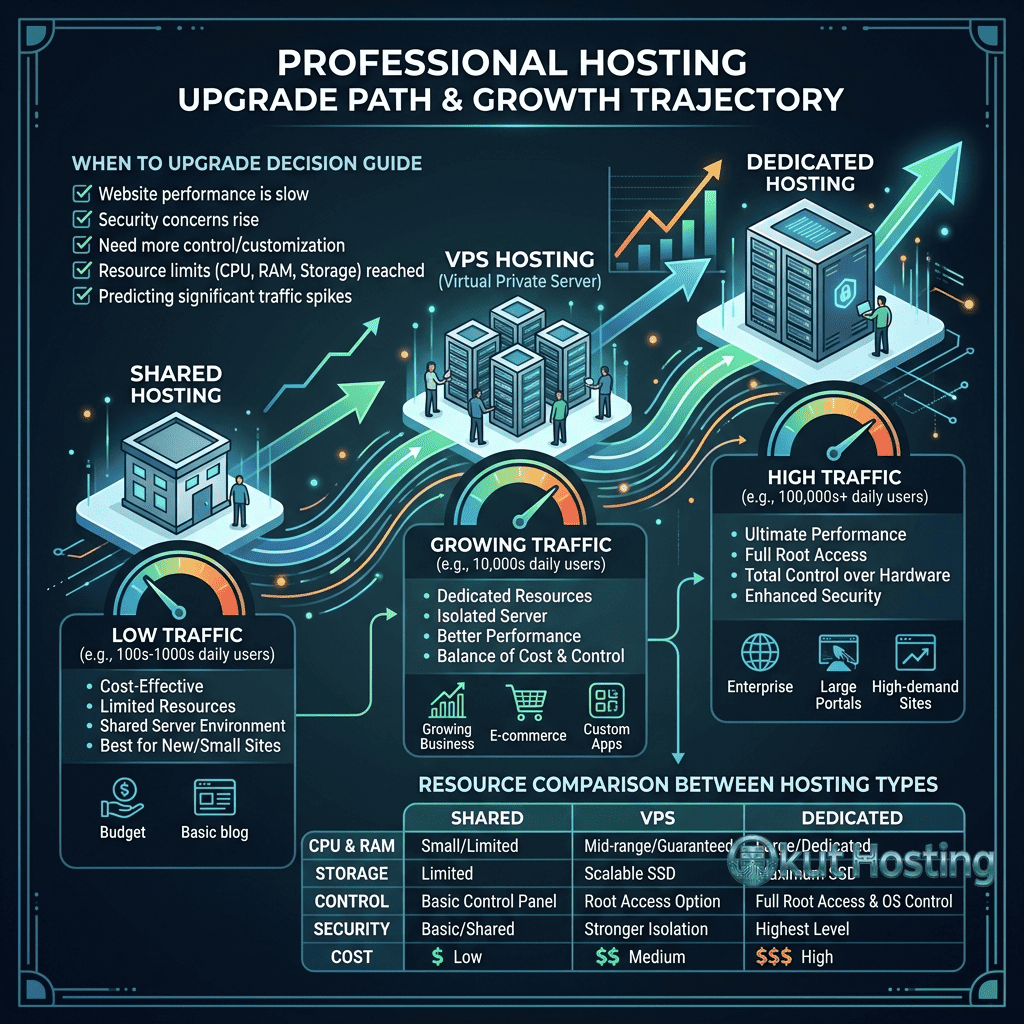
When to Upgrade Beyond Shared Hosting
Recognizing the signals that indicate shared hosting has been outgrown enables proactive upgrade planning rather than reactive migration during a crisis. Key indicators that shared hosting is no longer adequate include:
- Consistent slow page loads: Page load times consistently exceeding 3 seconds despite optimization indicate resource constraints that require more processing power.
- Frequent 500 or 503 errors: Server error pages caused by resource exhaustion indicate that the website’s resource demands exceed the shared hosting allocation.
- CPU throttling notifications: Hosting provider notifications about CPU limit exceedances signal that the website needs more processing capacity.
- Traffic-related downtime: Website unavailability during traffic peaks indicates that the shared hosting environment cannot handle the site’s traffic levels.
- E-commerce growth: Growing WooCommerce stores with increasing orders and database sizes benefit from VPS resources.
- Security requirements: Compliance requirements for PCI, HIPAA, or data sovereignty may require the isolation that VPS or dedicated hosting provides.
- Custom software needs: Requirements for custom server software, specific database configurations, or specialized application environments require root access available only on VPS or dedicated hosting.
Upgrade Options
The primary upgrade paths from shared hosting include VPS hosting, cloud hosting, and dedicated server hosting. VPS hosting provides isolated virtual server resources with root access while remaining more affordable than dedicated servers. Cloud hosting provides on-demand resource scaling for traffic-variable workloads. Dedicated servers provide full hardware resources for maximum performance and complete configuration control.
Managed VPS hosting is the most common upgrade path for shared hosting users because it provides dedicated resources with root access while maintaining the managed hosting experience that shared hosting users are accustomed to. The hosting provider handles server maintenance, security updates, and infrastructure management, allowing the user to focus on website management rather than server administration.
Maximizing Shared Hosting Value
Before upgrading, maximizing performance within shared hosting constraints can extend the hosting’s useful life. Key optimization strategies include: implementing server-level or plugin-based caching to reduce PHP processing, optimizing images for web delivery (compression and proper sizing), minimizing WordPress plugin count, implementing CDN for static content delivery, optimizing database queries and performing regular database maintenance, using efficient WordPress themes optimized for performance, and scheduling resource-intensive tasks during off-peak hours.
These optimization strategies can significantly improve shared hosting performance, potentially delaying the need to upgrade. However, optimization cannot indefinitely overcome fundamental resource limitations — when a website genuinely outgrows shared hosting capacity, upgrading provides the only sustainable path to continued performance and growth.
Summary
Shared hosting limitations are inherent consequences of the shared resource architecture that makes shared hosting affordable and accessible. Understanding these limitations — resource contention, CPU and memory constraints, I/O limitations, traffic caps, security considerations, and configuration restrictions — enables realistic expectations and informed hosting decisions. Shared hosting remains the appropriate choice for small to medium websites with moderate traffic, but recognizing when website growth exceeds shared hosting capacity ensures timely upgrades that maintain website performance and user experience.
For website owners evaluating their current shared hosting, monitoring resource utilization, page load performance, and error frequency provides the objective data needed to determine whether shared hosting continues to meet requirements or whether upgrading to VPS or dedicated hosting would provide measurable performance and reliability improvements worth the additional investment.
This guide provides general information about shared hosting limitations applicable across hosting providers. Specific resource allocations and limitations vary by provider and plan tier. Okut Hosting is an independent review platform with no affiliate relationships with any hosting company mentioned in this article.
For related content, see our uptime comparison guide, our hosting migration guide, and our SiteGround shared hosting review.